14-Alexandrite
December 16, 2020
Solved

Setting up/Preparing CAD model for symmetry for static simulation?

  • December 16, 2020
  • 1 reply
  • 1857 views

To all,


I want to do an analysis with symmetry. I have a solid model with the 2 DTMs for the symmetry.

What is the best way of “splitting” the model to have the faces required to apply the symmetry conditions? to start with I simply did a ‘Extrude feature/Remove material’ thus ending up with a cut model with the faces needed

Is this the only way to do it?


Thanks

Best answer by tbraxton

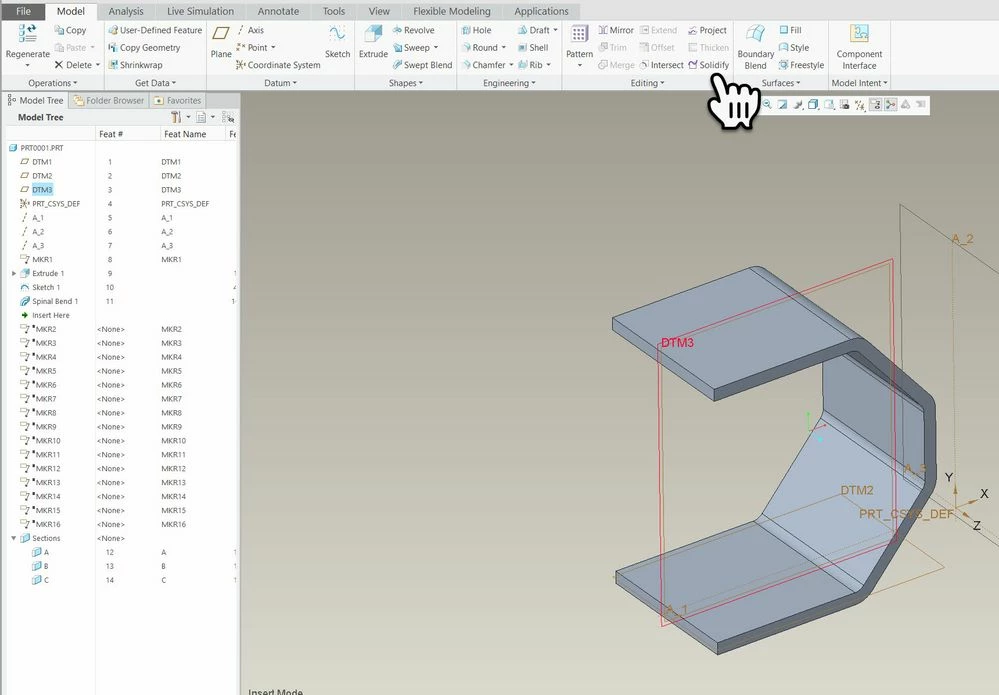
You can do it in part mode to prepare the geometry for analysis. If you have the default UI layout it will be in this location in part mode.


Solidify plane for cutSolidify plane for cut


1 reply

tbraxton
22-Sapphire II
22-Sapphire II
December 16, 2020

You can use a symmetry datum plane to cut the solid geometry. Select the datum plane and then use the solidify option and select the side to cut away.

JXBWk14-AlexandriteAuthor
14-Alexandrite
December 16, 2020

Thanks. Where is the solidify option you are referring too?

I guess one must do that in: Application/ Simulate

tbraxton
22-Sapphire II
tbraxton22-Sapphire IIAnswer
22-Sapphire II
December 16, 2020

You can do it in part mode to prepare the geometry for analysis. If you have the default UI layout it will be in this location in part mode.


Solidify plane for cutSolidify plane for cut