
2-Explorer
October 17, 2013
Question

Simulation Icons

  • October 17, 2013
  • 1 reply
  • 2929 views

Is there a way to change how big the simulation icons (load, constraints, etc) appear on the screen? Mine are really small on my laptop, making it hard to see them.
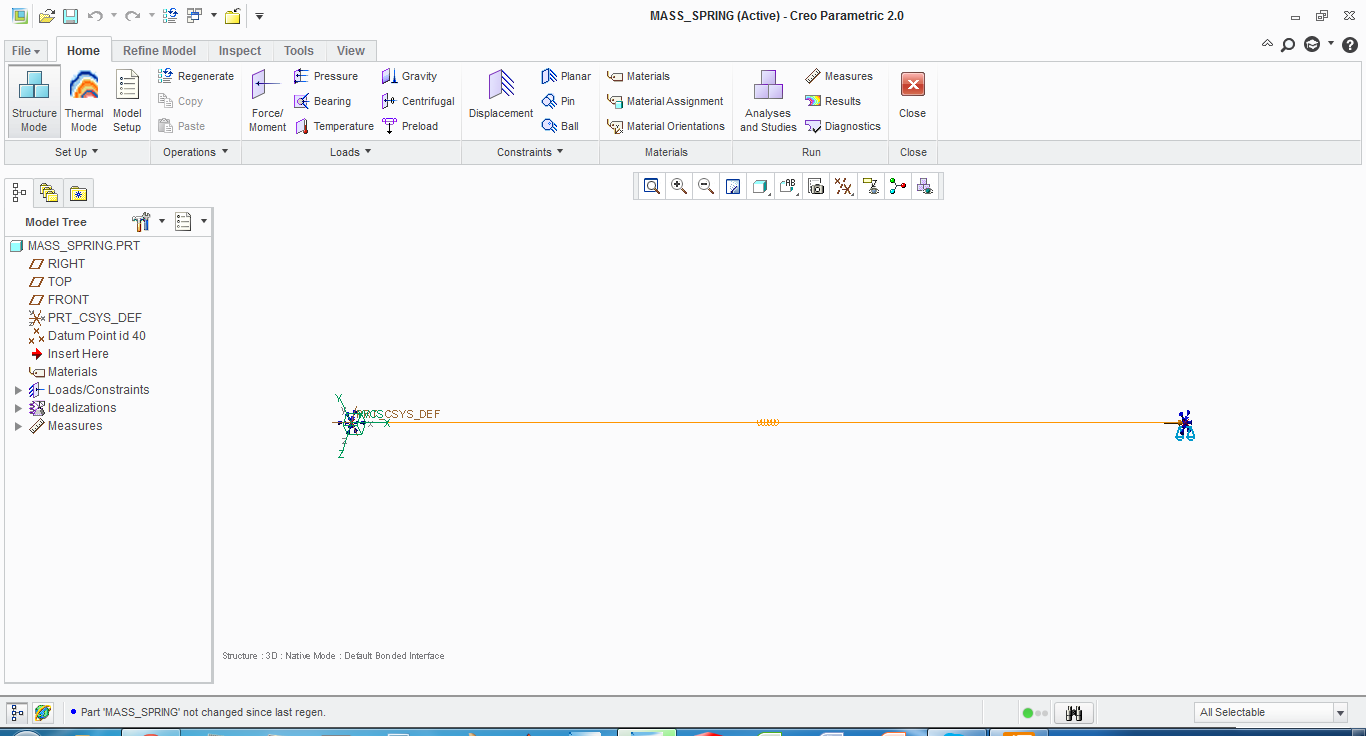
Small+Icons.png


This thread is inactive and closed by the PTC Community Management Team. If you would like to provide a reply and re-open this thread, please notify the moderator and reference the thread. You may also use "Start a topic" button to ask a new question. Please be sure to include what version of the PTC product you are using so another community member knowledgeable about your version may be able to assist.

1 reply

1-Visitor
October 18, 2013

Assuming you are refering to the simulation icons on the model then yes you can provided you use the older 2D icons. In the simulation display menu under "settings" tab, select the checkbox for "icons" and increase the scale. With the 3D icons you can uncheck the "zoom-invariant" box and that will make the icons larger as you zoom into the model.

Hope that helps,

- J -

2-Explorer
October 21, 2013

Unfortunatley, I'm trying to scale up the 3D icons.

1-Visitor
October 21, 2013

Shuan,

Un-check Zoom-Invariant and see if this helps.simulate+3d+icon+size+settings.jpg

Don Anderson