5-Regular Member
August 18, 2020
Question

Study of gravity effect

  • August 18, 2020
  • 1 reply
  • 4832 views

Hello all


I want to analyze he effect of gravity on the pot placed on stand.

When we placed the pot towards the end of stand due to the gravity it should fall down.

Can we create this situation in creo & see?
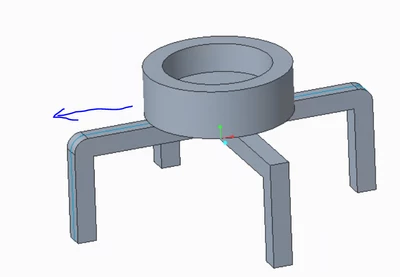
slokaksha_0-1597752092060.png


1 reply

KenFarley
21-Topaz II
August 18, 2020

Maybe I'm looking at it too simply, but don't you just need to have Creo calculate the center of gravity of your assembly of the pot and legs? If the gravity force vector is outside the legs, it tips over. Isn't that all you need, or is there some other force(s) involved?

slokaksha5-Regular MemberAuthor
5-Regular Member
August 18, 2020

hey @KenFarley 


Thanks for the reply. Actually I am looking for animated video of this gravity effect. So that I can see & measure few of the parameters from it.

12-Amethyst
September 9, 2020

How long time would you like spending in the simulation 🙂


If you do not matter  I would suggest to use friction less contact between both parts and displace the upper part laterally until the CG is out of the base. At this point the gravity will make the part to tilt.


You can use a prescribed lateral displacement with sub steps to create a nice video.


You can move a point attached to the upper structure with gravity direction RX RY free and all other DOF fixed (you may need some constrain adjustments here is you find some simulations error).


So you will see when the first tilt occurs meaning that from this point one the fall will start.


The hole point is to limit the amount of movement between steps otherwise you will have convergence problems.


I would create a shift enough to see the initial tilt. Otherwise the simulation may take too long. Also do not put this auxiliar point in the CG of the part - put it outside. So you can see the tilt starting (what it will nit happen if you hold the part on its CG).
