
1-Visitor
January 20, 2015
Solved

Traceback Error

  • January 20, 2015
  • 2 replies
  • 13361 views

I have received a fatal error message and Creo says it has created a Traceback. Why did this happen and how do I fix this. I have gotten them before and once I did I was unable to check the model/assembly in. Any fixes for this?


This thread is inactive and closed by the PTC Community Management Team. If you would like to provide a reply and re-open this thread, please notify the moderator and reference the thread. You may also use "Start a topic" button to ask a new question. Please be sure to include what version of the PTC product you are using so another community member knowledgeable about your version may be able to assist.
Best answer by TomU

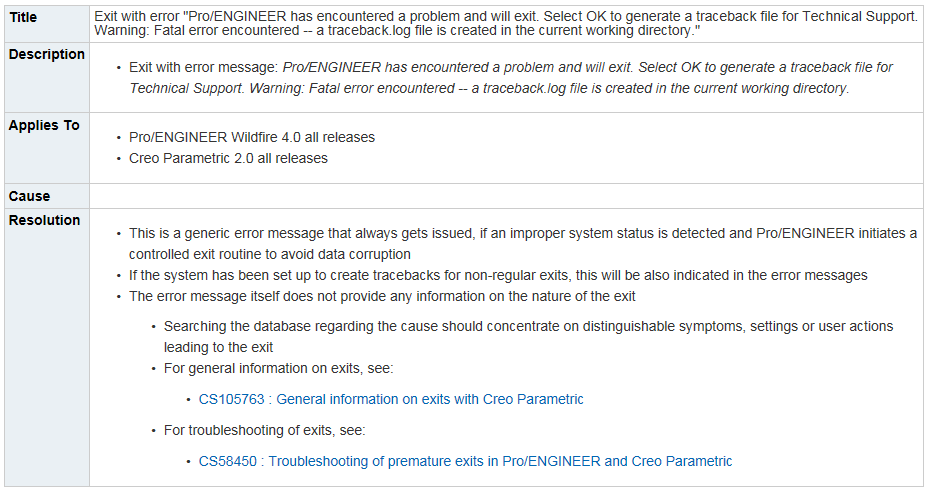
Here is the "official" word from PTC on traceback files:

12.PNG

https://support.ptc.com/appserver/cs/view/solution.jsp?n=CS49550

2 replies

23-Emerald IV
January 20, 2015

Pretty much any time Creo crashes or hangs it will automatically create a traceback file. This file can sometimes help tech support in diagnosing the problem. Unless you're interested in creating a support case, you can just ignore it and restart Creo.

1-Visitor
January 21, 2015

I also had similar issue, while working with top level assembly, when we switch off layer, Creo will crash with traceback error

StephenW
23-Emerald III
January 21, 2015

If this is a consistent, repeatable error, you definitely should open a call with PTC and they should be able to get it fixed.

TomU23-Emerald IVAnswer
23-Emerald IV
January 21, 2015

Here is the "official" word from PTC on traceback files:

12.PNG

https://support.ptc.com/appserver/cs/view/solution.jsp?n=CS49550