3-Newcomer
September 22, 2023
Solved

understanding scale in simulate results

  • September 22, 2023
  • 2 replies
  • 1841 views

Could someone explain "scaling" in the display options when viewing simulate results? If it's kept at zero is what's displayed a realistic deformation?



Best answer by SweetPeasHub

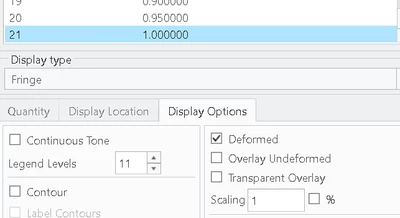
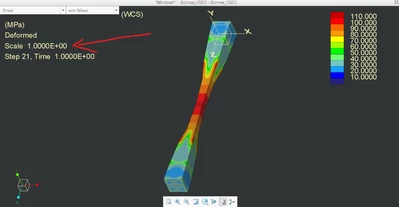
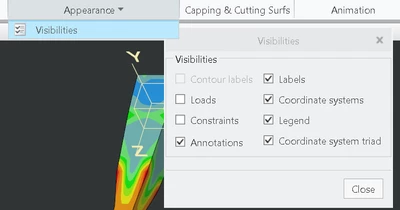
In Display Options, for 1X scale put scaling 1.0 and uncheck the %. Also, the scaling factor is shown in the results "labels" field.


SweetPeasHub_6-1695649051124.png


SweetPeasHub_3-1695648834123.png

SweetPeasHub_5-1695648959846.png


2 replies

KenFarley
21-Topaz II
September 25, 2023

I've never really understood what the numeric value of the scaling means with respect to the "real world". The deformations seen both static and animated are always exaggerated to *really* show the effect of the forces on the model. It's cartoonish, but helps to show the effect. If the program were to attempt to display the true deformation it might not be evident what changed - especially if you are seeing deflections on the order of 0.05mm or some other small but possibly significant amounts.


Hopefully someone who is more experienced in this particular aspect of the program will chime in with their understanding. Whenever I have presented results to people I've always used shaded plots of the model with contours. If I include a quick video of the model "deflecting", I always have to make a point that it's an order or orders of magnitude more than the actual part experiences.

17-Peridot
September 25, 2023

In Display Options, for 1X scale put scaling 1.0 and uncheck the %. Also, the scaling factor is shown in the results "labels" field.


SweetPeasHub_6-1695649051124.png


SweetPeasHub_3-1695648834123.png

SweetPeasHub_5-1695648959846.png