
1-Visitor
June 17, 2017
Solved

Warning Message when I open Creo.

  • June 17, 2017
  • 1 reply
  • 4732 views

This morning, when I opened CREO Parametric 3.0, I received this message:
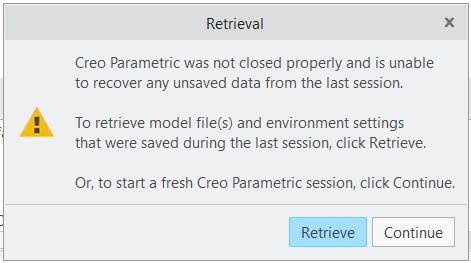
 

Retrieval message.JPG

When I clicked continue, I received a message about a 'jQuery' error and 'Script' error. When I requested for the script to stop running, I was faced with this blue screen:


Image result for your pc ran into a problem.


So, I proceeded to shut down my computer. When I rebooted my computer and opened the Creo program, I received the retrieval message again, along with the blue screen. I decided to shut down and reboot my computer. After the rebooting process, I uninstalled all Creo 3.0 files and installed Creo 4.0 files.


When I open Creo, I still get the retrieval message, but I also get a 'Warning Message List':
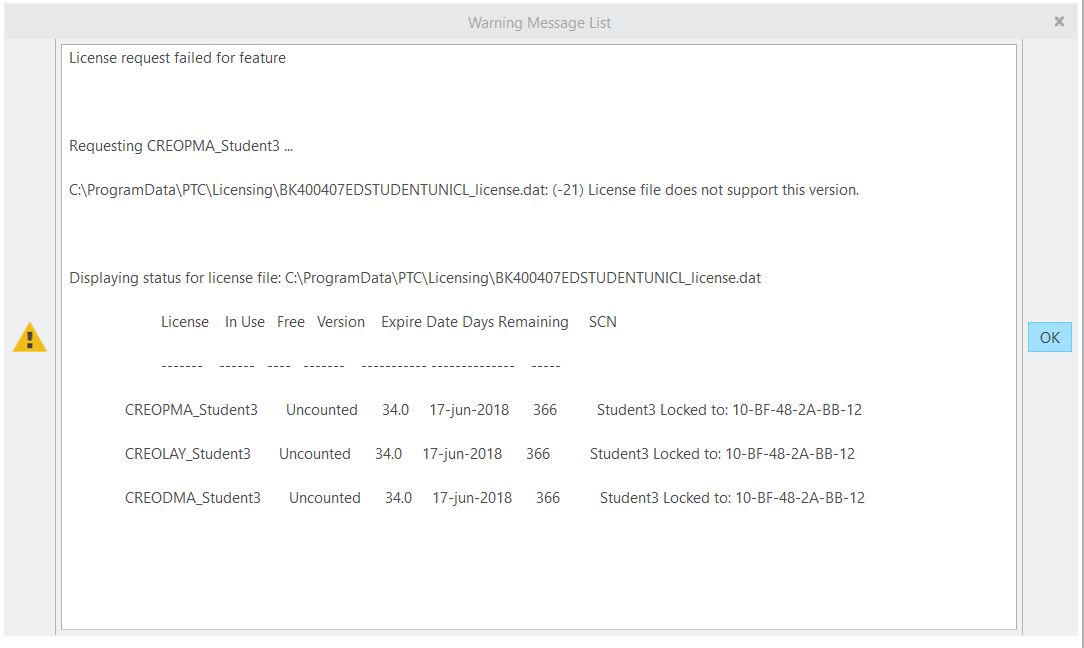
 

Warning Message.JPG

Clicking OK on this warning completely closes Creo Parametric.


Is anyone else encountering this issue and have you found a solution?

Best answer by MartinHanak

Hi,

install Creo 3.0 and try solution mentioned in UNEXPECTED_KERNEL_MODE_TRAP following Windows 10 Creator Update - Solution...‌ discussion.

In case of Creo 4.0 ... I guess that PTC did not publish Product code for it.

MH

1 reply

odavies1-VisitorAuthor
1-Visitor
June 19, 2017

Also, the code given for Creo 3.0 is the same code given for Creo 4.0. Is this a mistake? This is the code: BK400407EDSTUDENTUNICL

24-Ruby III
June 19, 2017

Hi,

install Creo 3.0 and try solution mentioned in UNEXPECTED_KERNEL_MODE_TRAP following Windows 10 Creator Update - Solution...‌ discussion.

In case of Creo 4.0 ... I guess that PTC did not publish Product code for it.

MH

odavies1-VisitorAuthor
1-Visitor
June 19, 2017

I tried the solution and it worked. I still received warning messages, but I was able to close those windows and continue with my work.