
1-Visitor
May 7, 2014
Question

Arbortext 6.0 (64 Bit) A15015 Cannot Open Schema/DTD

  • May 7, 2014
  • 3 replies
  • 3487 views

Can anyone help with this problem?

I have recently upgraded my PC and changed from Arbortext 6.0 to Arbortext 6.0 (64 Bit). Since the upgrade I have not been able to open any of my sgml files, I have setup the file locations as the previous PC but I get the following error message.
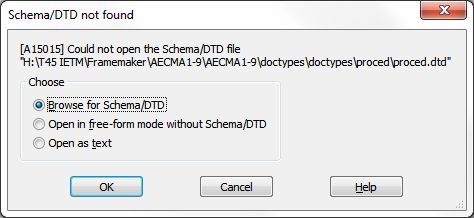
A15015.jpg

If a browse for the DTD I can find it in the location I have setup under File Locations but it then asks me to recompile the DTD (this did not happen with the 32-bit version), selecting OK does nothing and dialogue box remains open.
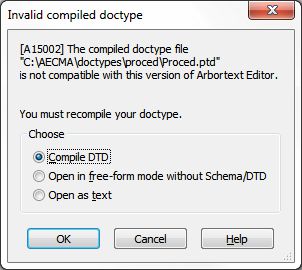
A15002.jpg

Has anyone any idea what is wrong, I guess it is a setup problem.

Thanks

3 replies

16-Pearl
May 7, 2014

It sounds like your APTCUSTOM folder is not getting picked up. What is your APTCUSTOM environment variable setting? That should match the location you have your custom folder (and doctypes) stored.

I'm not sure about compiling SGML DTDs but I guess you could try recompile with 64-bit version?

1-Visitor
May 7, 2014

Where do I find APTCUSTOM?

16-Pearl
May 7, 2014

Sorry I don't mean this to sound glib, but if you google for "windows show environment variables" you should be able to find a procedure to enumerate the environment variables. APTCUSTOM should be in that list. If it isn't, that may be part of your problem.

5-Regular Member
May 9, 2014

Hi Gary,

Hopefully Gareth and Bryon were able to help you out with this. If not, you may want to look n the help center for information on the custom folder, APTCUSTOM, and catalog paths.

One additional note, the error shows you are pointing to a .ptd file, which doesn't seem right. .ptf files are additional files created when the document type is compiled. You want to make sure you are pointing to the dtd or xsd file.

12-Amethyst
June 2, 2014

Arbortext Editor compiles document types, .dtd files.

3 files are created, .ptd, .pro and .dec.

Often an upgrade requires these files to be re-generated.

(Date stamps change, a minor change in the handling of .dtd functionality, 32-bit vs. 64-bit, etc.)

As the error message states, the .dtd file needs to be re-compiled, and the .ptd, .pro and .dec files need to be re-generated. Re-compilation probably needs to be done all your .dtd files.