
12-Amethyst
February 11, 2026
Question

Arbortext DITA2.0 Generated Text for Title in Table element adding extra period

  • February 11, 2026
  • 3 replies
  • 51 views

When I try to have the stylesheet auto number the figure and tables, everything works fine....EXCEPT....the generated table number text is putting an additional period after the Table X.X  (See Published Output image below).  
JHollis_0-1770844394848.jpeg


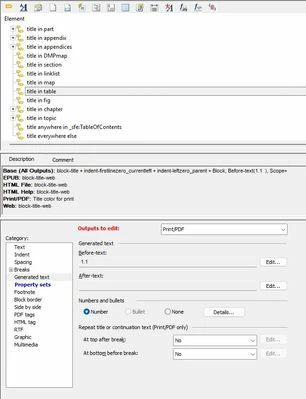
Looking into the generated text for Title in Table element (see below), it shows 1.1 as generated text for the PDF output. 
JHollis_1-1770844501019.jpeg

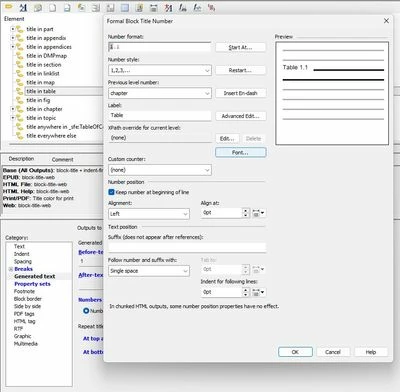
Looking further into the Number Details, it shows that it should only be producing Table X.X for a table title. (see below)
JHollis_2-1770844603168.jpeg


But yet, somehow it is producing Table X.X.  

Where is this extra period coming from?  Anyone have any idea?


Thanks,

John


3 replies

12-Amethyst
February 12, 2026

Hi John,


I looked into the snapshots for the generated text and look okay for now. However, I am not sure what else is pushing the extra period for the table element without having the appsave and other files.


Could you please check and match with the OOTB styelsheet to see what is causing this behavior? You might get some clue by matching the stylesheet you have developed Vs. OOTB one.


Regards,

Manpreet Singh

JHollis12-AmethystAuthor
12-Amethyst
February 19, 2026

Manpreet,

Thanks for the info.

I compared my stylesheet with the default stylesheet OOTB.  


Nothing that I can find is different.  The period is still there.


Makes no sense.  Figure Captions do not have it, nor do Section Titles.  Just Table Titles/Captions.


/r

John

Community Manager
February 19, 2026

Hello @JHollis


It looks like you have a response to your topic. If it helped you solve your question please mark the reply as the Accepted Solution. 
Of course, if you have more to share on your issue, please let the Community know so other community members can continue to help you.

Thanks,
Vivek N.
Community Moderation Team.

15-Moonstone
February 20, 2026

Looking at the screengrab, it looks like a Title in Fig, and in the shipped samples the Title in Fig does have a period after the number.

  • Are you working on the Resolved Document for Styling?
  • The best way to check that you are checking the content where you think you are, is to simply change the element to a colour - make it Red.
    • I would change title in fig to red and title in table to green - publish
  • Have you checked it is not being output by one of the Property Sets
  • Test using one of the shipped stylesheets and do a comparison

If then you still are unable to track down where the period is coming from I would suggest raising a PTC Technical Support case for further investigation.

We will only need a very short sample - a simple 1 page or chapter document that contains the element showing the behaviour.

I hope this helps you track down the source of the period.

Kind regards

Alexia


JHollis12-AmethystAuthor
12-Amethyst
March 13, 2026

Alexia,

Thanks for the info.  A couple of weeks ago I was going back through it again doing the same things i did before that should have worked, but didn't.

Then, all of a sudden, the extra period disappeared.

I did not do anything different that I am aware of, but now it is gone and everything looks fine.

SMH.....


/r

John