
12-Amethyst
August 25, 2025
Solved

Block structure type in Arbortext not displaying when published

  • August 25, 2025
  • 3 replies
  • 970 views

Hi, my company uses the block structure in certain Arbortext content. Recently, we migrated from Windchill 12 to 13 and lost this formatting/text when publishing.
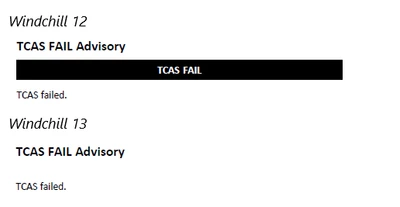
JSkog_0-1756141317520.png


We are using Arbortext w/ Styler 8.2.3.0. Please let me know if you need additional information.


Thanks for any help,

Jeff


Best answer by JSkog

I was able to resolve this by editing some settings in the block border category that seemed to replicate whatever feature had changed.

3 replies

JSkog12-AmethystAuthor
12-Amethyst
August 26, 2025

For further clarification, the topic published correctly under the previous installation of Arbortext (8.1.1.0). When my company upgraded to Windchill 13, we were required to upgrade Arbortext to 8.2.3.0 to maintain access. Therefore, we no longer have the option to use 8.1.1.0.


I have tried PTC Support steps for updating stylesheets (https://support.ptc.com/help/arbortext/r8.3.0.0/en/index.html#page/admin/admin/help8023_2.html) but didn't receive any prompts to update.


Thanks,

Jeff

JSkog12-AmethystAuthor
12-Amethyst
September 30, 2025

Hi, I am still unable to resolve this issue. Here are more details:


Viewing content in Arbortext w/ Styler 8.2.3.0, the topic displays as expected:

JSkog_0-1759229191145.png


However, when I open the stylesheet for this document, the display changes to this:

JSkog_1-1759229330298.png


The text "AUTO DESCENT" remains in the msgph element as white text. When published to pdf, the output displays as follows:

JSkog_2-1759229484864.png


Previously, using Arbortext 8.1.1.0, the topic would publish correctly:

JSkog_3-1759229556402.png


Does anyone have any suggestions? Please let me know if more details are needed.


Thanks for any help!

Jeff

JSkog12-AmethystAuthor
12-Amethyst
September 30, 2025

The Error Log lists this for that particular page in the published PDF:

<Record date="Tue Sep 30 11:58:38 2025" millis="1759251518"
severity="error" suppress="0">
<Level>ERROR</Level><Message>Pg 42 Javascript&colon; TypeError: formatting.currentTableCell
is null Font([object fStreamPos],true)@_gte:Font:96 _cellfont([object
fStreamPos])@_dtd:_cellfont:1 . [1500] (2:"_dtd:_cellfont"#0) (1:"editorDom0"#{1;/RDStyle/ResolvedMap/bookmap/part/topic[1]/topic[4]/topic[1]/body/context/msgblock/#_app:Gentext/_sfe:BeforeOrAfterText/table/tgroup/tbody/row/entry/_cellfont})

</Message>
</Record><Record date="Tue Sep 30 11:58:38 2025" millis="1759251518"
severity="error" suppress="0">
<Level>ERROR</Level><Message>Pg 42 Javascript&colon; _gte:Font:96: TypeError:
formatting.currentTableCell is null . [1500] (2:"_dtd:_cellfont"#0)
(1:"editorDom0"#{1;/RDStyle/ResolvedMap/bookmap/part/topic[1]/topic[4]/topic[1]/body/context/msgblock/#_app:Gentext/_sfe:BeforeOrAfterText/table/tgroup/tbody/row/entry/_cellfont})

</Message>
</Record><Record date="Tue Sep 30 11:58:38 2025" millis="1759251518"
severity="error" suppress="0">
<Level>ERROR</Level><Message>Pg 42 Javascript&colon; TypeError: formatting.currentTableCell
is null Font([object fStreamPos],true)@_gte:Font:96 _cellfont([object
fStreamPos])@_dtd:_cellfont:1 . [1500] (2:"_dtd:_cellfont"#0) (1:"editorDom0"#{1;/RDStyle/ResolvedMap/bookmap/part/topic[1]/topic[4]/topic[2]/body/context/msgblock/#_app:Gentext/_sfe:BeforeOrAfterText/table/tgroup/tbody/row/entry/_cellfont})

</Message>
</Record><Record date="Tue Sep 30 11:58:38 2025" millis="1759251518"
severity="error" suppress="0">
<Level>ERROR</Level><Message>Pg 42 Javascript&colon; _gte:Font:96: TypeError:
formatting.currentTableCell is null . [1500] (2:"_dtd:_cellfont"#0)
(1:"editorDom0"#{1;/RDStyle/ResolvedMap/bookmap/part/topic[1]/topic[4]/topic[2]/body/context/msgblock/#_app:Gentext/_sfe:BeforeOrAfterText/table/tgroup/tbody/row/entry/_cellfont})

</Message>
</Record><Record date="Tue Sep 30 11:58:38 2025" millis="1759251518"
severity="error" suppress="0">
<Level>ERROR</Level><Message>Pg 42 Javascript&colon; TypeError: formatting.currentTableCell
is null Font([object fStreamPos],true)@_gte:Font:96 _cellfont([object
fStreamPos])@_dtd:_cellfont:1 . [1500] (2:"_dtd:_cellfont"#0) (1:"editorDom0"#{1;/RDStyle/ResolvedMap/bookmap/part/topic[1]/topic[4]/topic[3]/body/context/msgblock/#_app:Gentext/_sfe:BeforeOrAfterText/table/tgroup/tbody/row/entry/_cellfont})

</Message>
</Record><Record date="Tue Sep 30 11:58:38 2025" millis="1759251518"
severity="error" suppress="0">
<Level>ERROR</Level><Message>Pg 42 Javascript&colon; _gte:Font:96: TypeError:
formatting.currentTableCell is null . [1500] (2:"_dtd:_cellfont"#0)
(1:"editorDom0"#{1;/RDStyle/ResolvedMap/bookmap/part/topic[1]/topic[4]/topic[3]/body/context/msgblock/#_app:Gentext/_sfe:BeforeOrAfterText/table/tgroup/tbody/row/entry/_cellfont})

</Message>
</Record>

Catalina
Community Moderator
October 17, 2025

Hi @JSkog 

Thank you for your question. 

Your post appears well documented but has not yet received any response. I am replying to raise awareness. Hopefully, another community member will be able to help.

Best regards, 

Catalina | PTC Community Moderator
JSkog12-AmethystAuthorAnswer
12-Amethyst
October 20, 2025

I was able to resolve this by editing some settings in the block border category that seemed to replicate whatever feature had changed.