

change the order of attributes in dialog box?
Is there a way (within ACL?) to change the order in which attributes appear in the MODIFY ATTRIBUTES dialog box?
Hypothetical: There's a tag called CSN. It has 5 attributes: Chapter Number, Section Number, Unit Number, Figure Number, and Item Number (that's how you can find the part in the part catalog index elsewhere in the manual).
Based on the DTD, Arbortext knows the five attributes. So when I enter a tag, Arbortext wants me to populate those five fields. But I guess it displays the attributes in alphabetical order (not the way they appear in the text or the way users remember or speak them). This leads to mis-typing, errors and confusion.
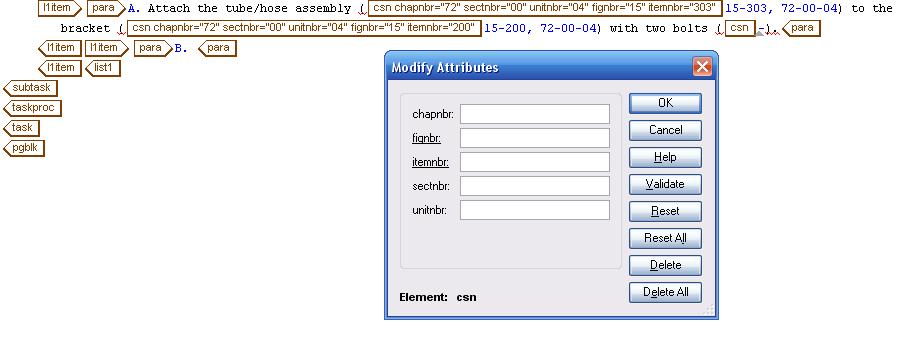
in the DTD, the attributes are listed the way I want:
<!ELEMENT csn - O EMPTY >
<!ATTLIST csn
chapnbr NUMBER #IMPLIED
sectnbr NUMBER #IMPLIED
unitnbr NUMBER #IMPLIED
fignbr NUTOKEN #REQUIRED
itemnbr NUTOKEN #REQUIRED >
You can see in the image the attributes appear the correct way when the full tag is displayed, and they appear correctly in the generated text.
How can I change the order in which the attributes appear in the dialog box?