
8-Gravel
May 5, 2014
Solved

Changing tag display size in Arbortext Editor

  • May 5, 2014
  • 2 replies
  • 3819 views

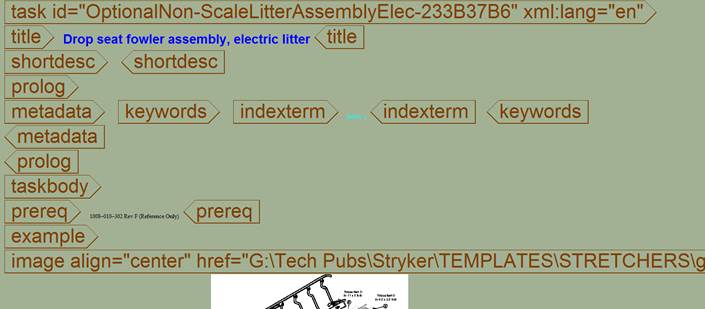
Does anyone know how to change the tag display size in Arbortext Editor? A teammate has somehow made her tag display size very large and is not sure how to set it back to normal size?
large_tag_sample.jpg


Thanks for your help!

Best answer by SuzanneNapoleon

At the command line, enter set tagfontpercent=100 to restore the original size. Use larger or smaller values to increase or decrease tag size. Use set fontpercent to resize text.

2 replies

12-Amethyst
May 5, 2014

At the command line, enter set tagfontpercent=100 to restore the original size. Use larger or smaller values to increase or decrease tag size. Use set fontpercent to resize text.

18-Opal
May 5, 2014

If you are in editor, hold ctrl and use the scroll wheel on the mouse. It changes the font size on my machine.

Bryon

5-Regular Member
May 6, 2014

As Suzanne states, tagfontpercent will modify just the tag size.

Bryon's method will modify both the tagfontpercent and editfontpercent at the same rate.