Solved
Creo Illustrate not updating with new pvz
We are using Creo Illustrate 3.0, accessing Windchill through Work Group Manager. When we start a new file we import from Windchill in order to maintain the link to the original PVZ file. However, when the PVZ file is changed based on engineering changing their files, our Creo Illustrate files does not update, nor prompts us that it's changed. This is very frustrating when I know the design intent is for the data to stay linked/related.
Can anyone tell me what we may be doing wrong? Could it be something in Work Group Manager isn't set up correctly?
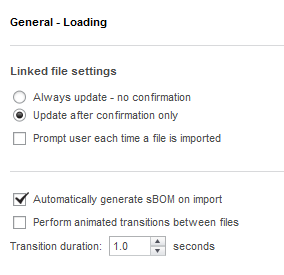
Here's our General Loading setting for Creo Illustrate: