


disabling effect of toolbar icons in Arbortext Editor 7.0
Hi,
currently we are making tests with the newest Arbortext Editor Version 7.0. As you know the toolbar icons in this new release are renewed. The new icons are very nice and we would like to use them. The buttons are defined in the editwindow.xml. In our customization (acl-file) we use following code to show the toolbar button "activated" or "deactivated" (gray style) (we would like activate them only if the cursor is in context to insert the xml-structure):
if(in_context("emphasis") == 1)
{
dlgitem_activate(0, "Toolbar_Fett")
dlgitem_activate(0, "Toolbar_Unterstreichen")
dlgitem_activate(0, "Toolbar_Durchstreichen")
}
else
{
dlgitem_deactivate(0, "Toolbar_Fett")
dlgitem_deactivate(0, "Toolbar_Unterstreichen")
dlgitem_deactivate(0, "Toolbar_Durchstreichen")
}
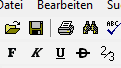
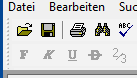
We noticed that in Version 7.0 the effect of disabling the buttons has not much difference with the activated button. In the earlier version the user could see this difference better. To demonstrate this, please look at this screenshots:
This is how it was in Version 6.0 with bmp toolbar icons, if the buttons are activated:
This is how it was in Version 6.0 with bmp toolbar icons, if the buttons are deactivated (you can see the gray effect, at the disabled buttons):
This is how the bold toolbar looks like in Version 7.0 if the button is activated:

This is how the bold toolbar icon looks like in Version 7.0 if the button is deactivated:

As you can see, there is not much difference, so that unfortunately this new icons are not satisfactory for our use.
Must we build own icons which less saturation to make own grayed buttons, which we must show or hide in acl code? That would be not fine. Is there maybe anything wrong what we do or another way to get the desired effect (like in the earlier version) of deactivating and activating buttons?
We hope you can understand our problem. Thank you for your support in advance.
Greetings from Germany.