
1-Visitor
October 26, 2015
Solved

Epic Editor 4.3 displaying plain xml, no document map

  • October 26, 2015
  • 2 replies
  • 1210 views

The Editor does not give the option to edit the document map, and only displays straight XML.
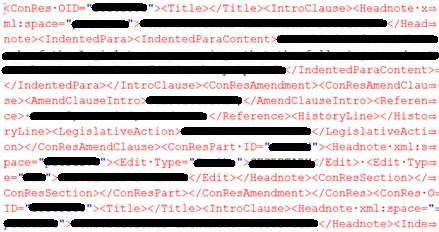
XMLText.png

How do I get the document map to show up again?

Best answer by zcoulombe

Thank you very much.

We figured it out. One of our developers tried to virtualize the mapped drive which contained the dtd files, and the Epic Editor could not find the new file location. Once we restored the mapped drive to it's pervious state everything began functioning properly.

Zach

2 replies

5-Regular Member
November 14, 2015

Hi Zachary,

This looks like maybe the document isn't referencing the DTD correctly, and just showing as text.

If you open up the Help -> About Editor -> Session dialog, and then navigate to the 'Document' tab, does it show all the expected information (dtd being used, etc)?

zcoulombe1-VisitorAuthorAnswer
1-Visitor
November 16, 2015

Thank you very much.

We figured it out. One of our developers tried to virtualize the mapped drive which contained the dtd files, and the Epic Editor could not find the new file location. Once we restored the mapped drive to it's pervious state everything began functioning properly.

Zach