1-Visitor
February 26, 2016
Solved

Extra options in New Dialog when connected to Windchill

  • February 26, 2016
  • 2 replies
  • 3994 views

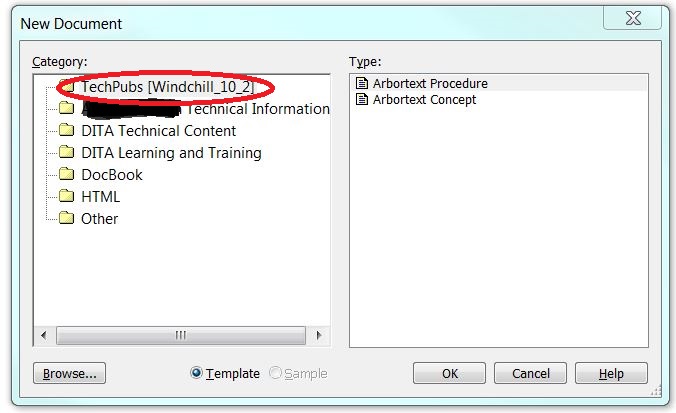
Can someone explain why a new option appears in the New Dialog when connected to Windchill? Can it be suppressed?

The Windchill instance is SIM 10.2 M030.

Thanks.
New Doc Menu.JPG

Best answer by Pushpinder_Toor

Hi Jeff-

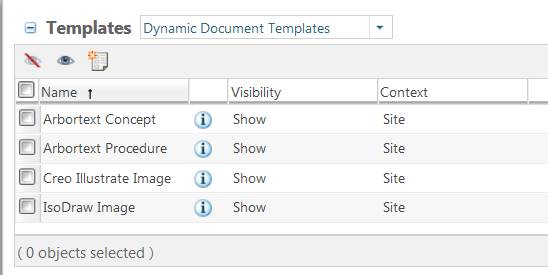
Are you logged on as Site administrator? SIM creates two templates at the site level. Make sure you select "Dynamic Document Templates" from the drop-drown to the right of the "Templates" label.

2 replies

12-Amethyst
February 26, 2016

New dialog content is defined in the .dcf files.

Do you have a document open, when you select File > New?

If so, then you could use Help > Session > Document tab to view the .dcf file that Arbortext Editor is looking at.

If not, then you still may want to look at the current .dcf. It can be determined as stated above.


1-Visitor
February 27, 2016

Hi Tim,

No files are open. The extra option only shows when Editor is connected to Windchill. The name of the extra option is the context that the user is signed into.

Thanks,

-Jeff

12-Amethyst
March 9, 2016

Do you have document type defined in your Arbortext install path

...\adapters\com.ptc.prowt.arbortext\doctypes?

5-Regular Member
March 24, 2016

Is this a template you have installed on your SIM instance?

1-Visitor
March 24, 2016

Hi Pushpinder,

We haven't installed any templates to SIM. Our customer sees the same thing. Where can I check for templates on SIM?

Thanks,

-Jeff

5-Regular Member
March 25, 2016

Hi Jeff-

In SIM, open the Browser pane and select the Product. You should see "Templates" listed on the left hand side. Once you open the Templates section, see if you have one called "Tech Pubs...." and what its visibility is set to.

Pushpinder