

10-Marble
July 13, 2017
Solved

How do I install a custom toolbar that I have, for another user?

  • July 13, 2017
  • 1 reply
  • 2030 views

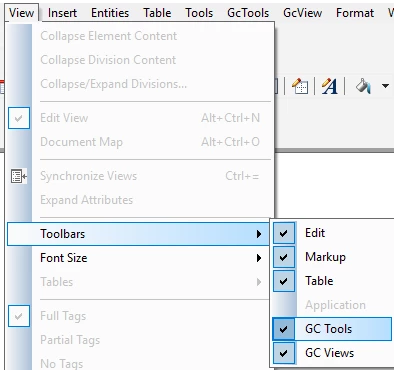
We have two custom toolbars. A co-worker got a new PC and when Arbortext was installed on it, it didn't have these two custom toolbars. Basic question: how do I get them for her? Ancillary question: Where the heck do I find them on my install (the files, not the toolbar). In this screenshot, I have the option to show GC Tools and GC Views. On hers, these options are not there. How do I make it happen?
 

AT_toolbars.PNG

Best answer by azibuck

I compared
\\users\[my computer name]\AppData\Local\PTC\Arbortext\Editor\.aptcache\zc
\\users\[her computer name]\AppData\Local\PTC\Arbortext\Editor\.aptcache\zc

She had nothing in the zc folder. I had a folder there that included subfolders including one called custom that contained editwindow.xml, that called in the toolbars. I copied the whole subfolder structure from my zc folder to hers and now she's got the toolbars.

1 reply

azibuck10-MarbleAuthorAnswer
10-Marble
July 18, 2017

I compared
\\users\[my computer name]\AppData\Local\PTC\Arbortext\Editor\.aptcache\zc
\\users\[her computer name]\AppData\Local\PTC\Arbortext\Editor\.aptcache\zc

She had nothing in the zc folder. I had a folder there that included subfolders including one called custom that contained editwindow.xml, that called in the toolbars. I copied the whole subfolder structure from my zc folder to hers and now she's got the toolbars.