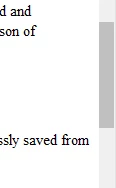
Question
How do I manipulate scrollbar color in Arbortext?
I have a user whose scroll bar area is as white the text background. There is a grey bar that she can grab and scroll with, and if she clicks over or under that bar, the page will "scroll", so the bar itself is working fine. But the background of the scroll area is not there. It's not a big deal, but the user used to have this feature until getting a new machine. Unfortunately it was months ago so her old machine (and install) is long gone. See the screen shot of my view. She has the dark grey bar, but not the light grey area next to the word "from" It's just as white as the page background..