
1-Visitor
April 29, 2013
Solved

How is "placeholder" text created in a style?

  • April 29, 2013
  • 1 reply
  • 1443 views

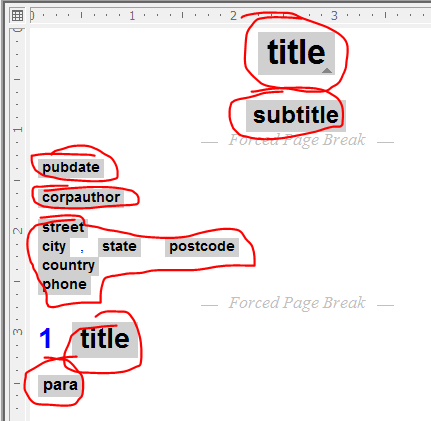
If you open a new document in Arbortext and select "Arbortext XML DocBook V4.0", the empty document presents several "placeholder" texts for title, pubdate, corpauthor, street, and so forth (see image)
Placeholder+Text.PNG

How can this placeholder text be generated in styler? Whenever I style an element and it's empty, there is nothing displayed on the editor.

    Best answer by ClayHelberg

    Hi William--

    This is controlled by the set showemptyelement option. Normally this is on, but there may be some code in your configuration that turns it off for your doctype.

    To see if this is the problem, load up the document you want to test, and check Tools->Preferences->View->Edit View->Tag Prompts. If this is unchecked, go ahead and check it and then click OK. You should now see the gray tag prompts (assuming you have tag display turned off in the editor view).

    --Clay

    1 reply

    18-Opal
    April 30, 2013

    Hi William--

    This is controlled by the set showemptyelement option. Normally this is on, but there may be some code in your configuration that turns it off for your doctype.

    To see if this is the problem, load up the document you want to test, and check Tools->Preferences->View->Edit View->Tag Prompts. If this is unchecked, go ahead and check it and then click OK. You should now see the gray tag prompts (assuming you have tag display turned off in the editor view).

    --Clay

    1-Visitor
    April 30, 2013

    Excellent - thanks for the quick reply.