
1-Visitor
April 4, 2014
Solved

How to colour table header in PDF

  • April 4, 2014
  • 1 reply
  • 2223 views

Hello all,

I am looking for the way to colour the content of <thead> element.

Custom table might work but I want to skip it this time as it is not a custom table.

Therefore, I tried some source editting with "backgroundColor" attribute of "fTable" which also did not work.

I am not familiar with Javascript so it is very difficult to figure out.

Does anyone know how to colour it? or is it even possible?

Thank you.
Best answer by jgroos

Hello Tomomi,

it's possible

1. Create a property set and add following line at the end of the "OnEnter" section:

formatting.currentTableCell.backgroundColor = "#D6D6D8";

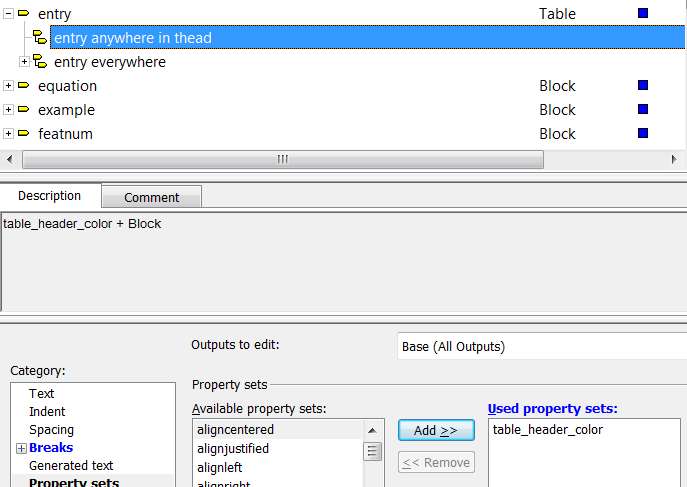
2. Create a context for entry: "anywhere in thead" and add the property set to that context

context.jpg

Best regards

Joachim

1 reply

jgroos1-VisitorAnswer
1-Visitor
April 4, 2014

Hello Tomomi,

it's possible

1. Create a property set and add following line at the end of the "OnEnter" section:

formatting.currentTableCell.backgroundColor = "#D6D6D8";

2. Create a context for entry: "anywhere in thead" and add the property set to that context

context.jpg

Best regards

Joachim

1-Visitor
April 4, 2014

Hello Joachim,

Thank you very much for your guidance.

It totally worked! It is amazing

Kind regards,

Tomomi