
1-Visitor
May 9, 2013
Question

Inserting filename of image

  • May 9, 2013
  • 1 reply
  • 1762 views

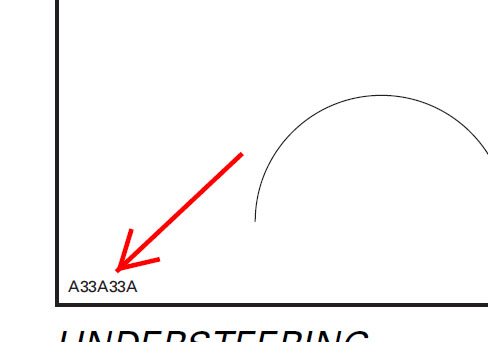
I'm starting to study ArborText and I have a few questions. I converted fos-file (Arbortext Epic) to style-file (Arbortext 6.0) and lost some element. I need to insert name of the img file into border of picture. Please, help me!
Untitled-1.jpg

1 reply

18-Opal
May 9, 2013

This is what we use it places our number on the RH side.

Define h As Integer

Define w As Integer

w = activeDoc.window.pageX-2

h = 2

#Message "The height is " + h

#Message "The width is " + w

#Added below command to ensure number is placed on the Illustation number layer

ACTIVATE LAYER "Illustration Number"

Select none

Text Align Left

Text font 'Arial'

Text size 6

Create Text w h stripext(activeDoc.name)

Rotate selection w h 90

Bryon

1-Visitor
May 9, 2013

Thanks you for answer! I'm sorry, but I am still a novice with Arbortext. I understand that it is some sort of script, but I don't know where I must insert it.

18-Opal
May 9, 2013

Sorry should have been more descriptive, the scipt is a macro. If you go to macro, record macro. It will allow you to record your actions in IsoDraw. When you save it, it will now allow you to repeat the exact same function over and over again. If you copy the script and open notepad, then save it, then rename it to an .ism file. Copy the file and paste it here C:\Program Files (x86)\PTC\Arbortext IsoDraw 7.3\Program\Macros. When you launch IsoDraw it should show up in the list under macros. It will probably not work right as our template has an illustration number layer. IF you record a macro from scratch it will be saved here C:\Users\XXXXXX\AppData\Roaming\PTC\IsoDraw\Macros

Bryon