1-Visitor
November 1, 2013
Solved

Is it possible to make a set of tags to look in a different order with Arbortext Styler?

  • November 1, 2013
  • 1 reply
  • 2010 views

Hello all,

I have here a very complecated question.
Is it possible to make a set of tags to look in a different order?
Please have a look at the exapmle below.

Example:

<Tag A> contains texts.
<Tag B> contains an image.

---------------------a part of xml document----------------
<Parent Tag>
<Tag A> Apples are red. </Tag A>
<Tag B>[image of apples] </Tag B>
</Parent Tag>

<Parent Tag>
<Tag A> Oranges are orange.</Tag A>
<Tag B> [image of oranges] </Tag B>
</Parent Tag>
----------------------------------------------------------------------


I want to make the appearance of this set of tags like below.

----------------a part of xml document---------------------
<Parent Tag>
<Tag A> Apples are red. </Tag A>
<Tag A> Oranges are orange.</Tag A>
</Parent>

<Parent Tag>
<Tag B> [image of apples] </Tag B>
<Tag B> [image of oranges] </Tag B>
</Parent Tag>
----------------------------------------------------------------------

I am wondering if this is possible with Gentext in Arbortext Styler.

If you don't understand what my question is, please feel free to ask.
Your advice is very very much appreciated!!

Kind regards,
Tomomi
    Best answer by jgroos

    Hello Tomomi,

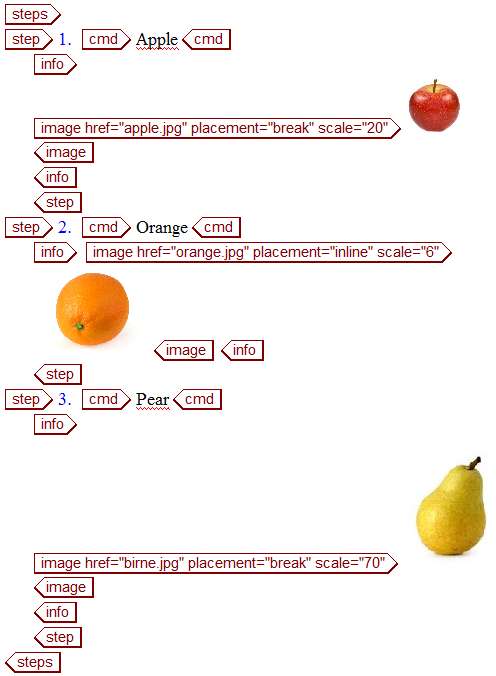
    I created a new example with the same structure you have:

    structure.jpg

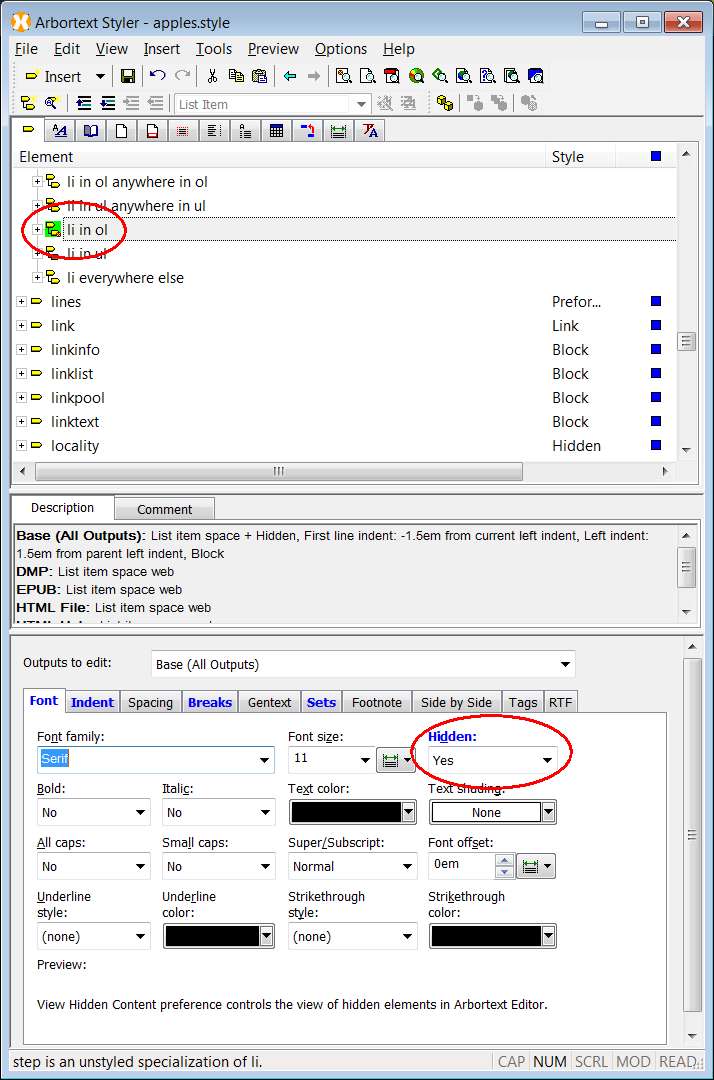
    In Styler set the step to hidden

    hidden.jpg

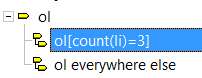
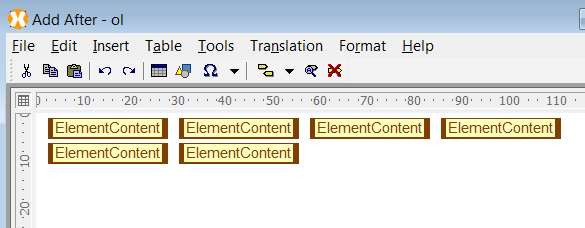
    For steps, create a new context where you have to specify the number of children

    ol.jpg

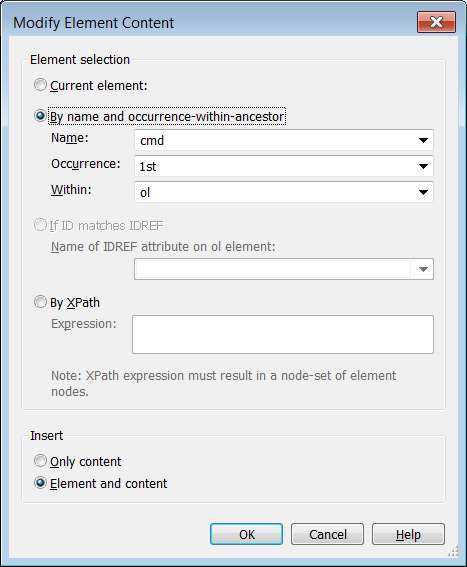
    With this context you can use the Gentext after to display the cmd elements. The image shows how to use the first cmd element. Do it the same way for the second and for the third.

    elemen1.jpg

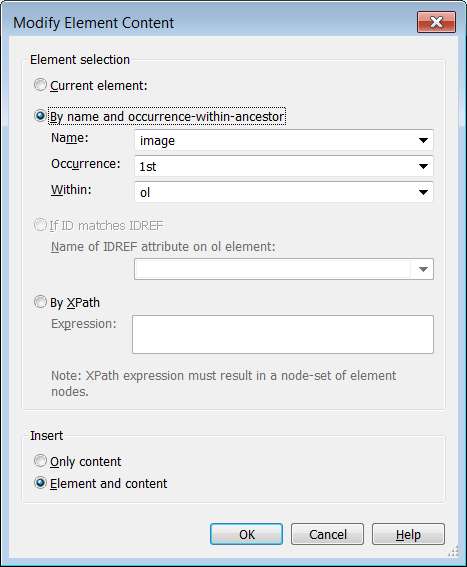
    The same approach works then for the images

    element2.jpg

    In total we need 6 elements added to the gentext: 3 for the cmd element, 3 for the images

    addafter.jpg

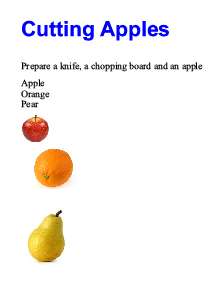
    This is my outpout:

    output.jpg

    It's not a perfect solution because you have to create several instances of your steps element, covering all numbers of children.

    A dynamic solution would be possible as well, but this needs APP skills and source edit.

    Hope it helps

    Joachiim

    1 reply

    1-Visitor
    November 1, 2013

    Hello Tomomi,

    you need a wrapping element around the elements you want to display in a customized order.
    In this example I use section:

    structure.jpg

    Then create two contexts to identify the different elements. Here: first p in section and last p in section

    p.jpg

    Set Font = Hidden for the last p in Section

    For the first p in section create a gentext (Add after element content):

    gentext.jpg

    This is the output:

    output.jpg

    Hope this helps,

    best regards

    Joachim

    1-Visitor
    November 4, 2013

    Dear Joachim,

    Thank you very much for your answer.

    It is very nice of you to include the images and good explanations.

    I tried it on my document but my document has a specialised structure (DITA task topic) so it seems difficult to apply. I didn't know this matters.

    My document has the same structure as the following example.

    -----Example----------------------------------------------------------------------------------------------------------------------------------

    <task id="xxxxx" xml:lang="ja-JP">

    <title>Cutting Apples</title>

    <taskbody>

    <prereq>Prepare a knife, a chopping board and an apple</prereq>

    <steps>

    <step><cmd>Rinse the apple lightly.</cmd>

    <info><image href="image 5.png"></image></info>

    </step>

    <step><cmd>Cut it as you like.</cmd>

    <info><image href="image 6.png"></image></info>

    </step>

    <step><cmd>Bon appetit!!</cmd>

    <info><image href="image 7.png"></image></info>

    </step>

    </steps>

    </taskbody>

    </task>

    -------------------------------------------------------------------------------------------------------------------------------------------------

    I have given a thought about using <substep> elements to state the procedures 1,2,3 , and wrap them with <step> element, instead of just using <step> elements in <steps> element.

    However, I would like to keep this structure as much as possible in order to stick to DITA.

    Do you think it is possible to achieve with this structure?

    I hope to hear from you.

    Kind regards,

    Tomomi

    jgroos1-VisitorAnswer
    1-Visitor
    November 4, 2013

    Hello Tomomi,

    I created a new example with the same structure you have:

    structure.jpg

    In Styler set the step to hidden

    hidden.jpg

    For steps, create a new context where you have to specify the number of children

    ol.jpg

    With this context you can use the Gentext after to display the cmd elements. The image shows how to use the first cmd element. Do it the same way for the second and for the third.

    elemen1.jpg

    The same approach works then for the images

    element2.jpg

    In total we need 6 elements added to the gentext: 3 for the cmd element, 3 for the images

    addafter.jpg

    This is my outpout:

    output.jpg

    It's not a perfect solution because you have to create several instances of your steps element, covering all numbers of children.

    A dynamic solution would be possible as well, but this needs APP skills and source edit.

    Hope it helps

    Joachiim