1-Visitor
July 1, 2011
Question

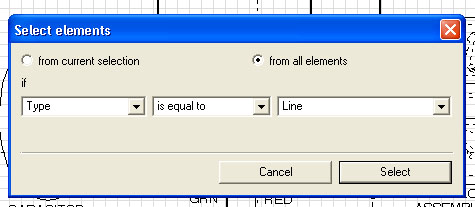
Is there a hot key for "select element" window?

  • July 1, 2011
  • 1 reply
  • 3789 views

My question is simple. Is there a hot or quick key combination for "select element" window? I use it a lot and it seems ridiculous to have to navigate to the menu bar everytime I want to use it. Any info on this would be greatly appreciated! Thanks!select_element.jpg

    1 reply

    24-Ruby III
    July 4, 2011

    Hello!

    You can add this command in a working toolbar (for faster access):

    Customize_Toolbar.jpg

    Also, a list of keyboard shortcuts in IsoDraw can be found here (but "select element" is not listed): http://communities.ptc.com/message/149043

    P.S. Which version of Arbortext IsoDraw you use?

    JeffWoods1-VisitorAuthor
    1-Visitor
    July 5, 2011

    Thank you! The toolbar button is helpful but I still wish there were a keyboard shortcut for it! Oh well. I am using IsoDraw 7.0

    July 6, 2011

    On the command line (you may need to enable full menus) type:

    response(menu_cmd("Mainmenuname.Submenuname"))

    For example:

    response(menu_cmd("Tools.3D Tools"))

    I made that path up, I'm not sure where it ends up. You will have to adjust it. Anyhow, this will display the command (or command alias) underneath that menu item.

    Now type the following on the command line:

    map Control-Alt-T EditElementCmdName

    Where you've replaced EditElementCmdName with the command revealed above.

    Now Control-Alt-T will open the Edit Element dialog.

    Assuming you like Control-Alt-T, you can now put this command in an ACL file (editelement.acl, for example) stored in the editinit subfolder in the custom folder and it will be available every time you start Editor with the doctype associated with the custom folder. There are other ways to associate it with a given doctype or every doctype. Read the help about instance.acl

    Oh, if you do not like Control-Alt-T or you are worried about what command is normally there, you can type the following on the command line:

    show fullkeymap

    To see every assigned keyboard shortcut.