
3-Newcomer
May 14, 2025
Question

Isodraw 7.3 GRIDS

  • May 14, 2025
  • 1 reply
  • 910 views

Good Day all

I am a new user and am having trouble setting up isodraw 7.3. I have had IT remote into my machine countless times to fix this problem to no avail. The problem is that when I try and Edit Preferences my Grid box is greyed out. Can anyone tell me how I can go about getting this problem taken care of.

V/r 

Johnnie White. 
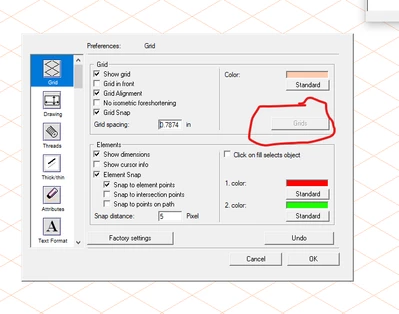
Screenshot 2025-04-08 111838 grids.png

1 reply

18-Opal
May 14, 2025

What are you trying to do?


If you have a new template open, click on window and make sure show attribute window has a check mark beside it.  Find the Grids icon and click on it. From there click on the triangle button and select new if you want to customise the grid coordinates


Bryon

JWhite33-NewcomerAuthor
3-Newcomer
May 15, 2025

My apologies for the rushed question should have been more precise. 

1. Its A company Pc that I do not have administrative access to

2. I have had IT remote in no less than 5 times so its probably not a simple fix.

3. I'm trying to configure my preferences Going off the 1 page procedure that I was instructed to follow (attached) and as a collective we can not figure out how to click on that Grids box. 

20250515_064141.jpg

4. I Thought the issue was in setting the environmental variables under my account name but IT came in yesterday and said that wasn't the problem.


18-Opal
May 20, 2025

You will need to put in a support case to PTC, as I cannot seem to make the grids option become active. You can change to Plane view on the grids tab on the attribute view.


Bryon