
11-Garnet
April 11, 2022
Solved

Listitem Lines Wrapping - Changes Spacing

  • April 11, 2022
  • 1 reply
  • 2365 views

Hello,

I am working on an APP stylesheet in Styler 8.1.2. The XML (Docbook) contains some simple ordered and itemized lists - when I preview or publish to PDF, long lines which wrap are causing the entire sentence to drop down by one line relative to the item.
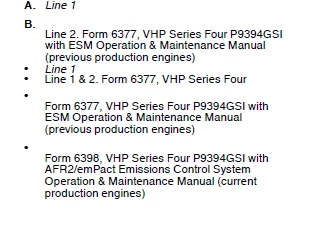
JL_9824280_0-1649706516782.png

The code that produces the above is as follows:


<orderedlist>
<listitem>
<para><?Pub _font Posture="italic"?>Line 1<?Pub /_font?></para>
</listitem>
<listitem>
<para>Line 2. Form 6377, VHP Series Four P9394GSI with ESM Operation
&amp; Maintenance Manual (previous production engines)</para>
</listitem>
</orderedlist><itemizedlist>
<listitem>
<para><?Pub _font Posture="italic"?>Line 1<?Pub /_font?></para>
</listitem>
<listitem>
<para>Line 1 &amp; 2. Form 6377, VHP Series Four</para>
</listitem>
</itemizedlist><itemizedlist>
<listitem>
<para>Form 6377, VHP Series Four P9394GSI with ESM Operation &amp;
Maintenance Manual (previous production engines)</para>
</listitem>
<listitem>
<para>Form 6398, VHP Series Four P9394GSI with AFR2/emPact Emissions
Control System Operation &amp; Maintenance Manual (current production
engines)</para>
</listitem>
</itemizedlist>


None of the changes I make to the elements in Styler make any difference to the output.

Does anyone have any idea what might be causing this, and a way to fix this problem?


Many thanks in advance


John

Best answer by ChrisWestern

Hi John

A little late the party here but have just seen your responce...

Yes you might want to check if the para within a list item context is a block type as well as the listitem itself so you dont get block line breaks in a row. It depends on the data model if listitem will always have one or more para's or can also contain text. It might need some additional test or conditions around it.


Thanks

Chris

1 reply

12-Amethyst
April 11, 2022

Hi John

From the mark-up I suspect you might want to add a "within listitem" context applied on the para without a block/para start being triggered.


Regards

Chris


tformat Publishing Solutions

www.arbortext.solutions


11-Garnet
April 11, 2022

Hi Chris,


I have this in Styler:

JL_9824280_0-1649709053521.png

Is this what you mean? I am still relatively new to this.


Many thanks!


John

12-Amethyst
February 21, 2023

Hi John

A little late the party here but have just seen your responce...

Yes you might want to check if the para within a list item context is a block type as well as the listitem itself so you dont get block line breaks in a row. It depends on the data model if listitem will always have one or more para's or can also contain text. It might need some additional test or conditions around it.


Thanks

Chris