

1-Visitor
October 16, 2013
Solved

Need a Really Simple Isodraw Instruction

  • October 16, 2013
  • 1 reply
  • 2530 views

Hey guys, played around with isodraw on and off for awhile. I can't find the answer in the documentation, but it should be a relatively simple answer. How do i get images to go inside the grid box? I open pvz and other cad types, and they always bigger than and far away from the grid. All the instructions show them as already being inside.

Many thanks

Bryon
Best answer by bfriesen

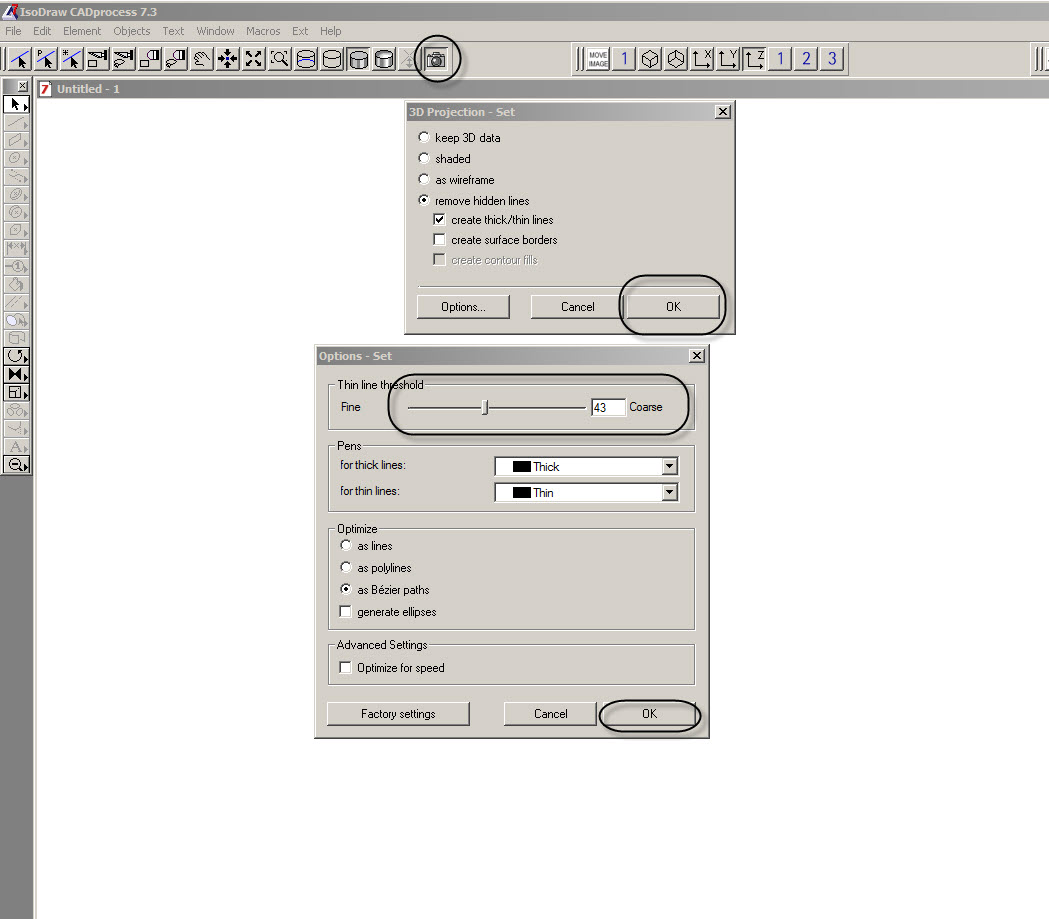
Your image is in the 3D enviroment, if you click on the camera, then click ok your image will be converted to 2D. If you need more or less detail click on options and move the slider accordingly, the smaller the number the more lines will show up. Once you have done this highlight your image by clicking on one of the lines, four red squares should show up around your image. Then you can follow the above instructions from Vladimir N.

Bryon Friesen

10-17-2013 8-43-56 AM.jpg

1 reply

24-Ruby III
October 17, 2013

Do you mean "Fit elements" option (in main menu select "Edit" -> "Move" -> "Fit elements")?

Pic_1.png

Pic_2.png

1-Visitor
October 17, 2013

I don't think so. Whether highlighted or not, Fit elements is grayed out for me. I'm referring to this.How do I get inside the box, and control the measurements of the box...

Thanks

10-17-2013+8-07-11+AM.png

bfriesen18-OpalAnswer
18-Opal
October 17, 2013

Your image is in the 3D enviroment, if you click on the camera, then click ok your image will be converted to 2D. If you need more or less detail click on options and move the slider accordingly, the smaller the number the more lines will show up. Once you have done this highlight your image by clicking on one of the lines, four red squares should show up around your image. Then you can follow the above instructions from Vladimir N.

Bryon Friesen

10-17-2013 8-43-56 AM.jpg