

Setting Default Publishing Engine (PE) Stylesheet when Publishing through the PE Server
I am running Arbortext 8.2.2.1 and using it in conjunction with Windchill 13.0.2.9.
We are trying to publish our manuals in PDF using the Arbortext Publishing engine (PE) with content stored in Windchill.
When I try to change the default stylesheet to our local company stylesheet, I do not have the option to change it.
Selecting File > Publish > PDF File opens up the Publish to PDF File window. Under Publishing, there is only the (pe) Standard DITA 2.0 Styler Stylesheet available from the dropdown menu.
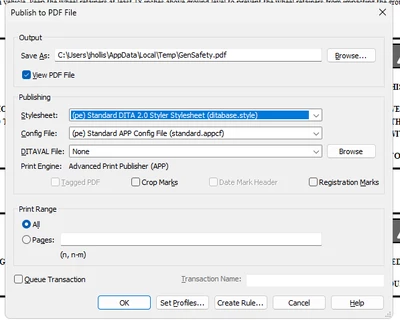
Where, and how, do I import our company stylesheet so I can replace the (pe) Standard stylesheet.
Working in a local (non-Windchill) environment, there is usually a Browse button beside the Stylesheet selection where I can select from many available stylesheets, but not when running through the Publishing Engine Server.
John