

18-Opal
October 17, 2013
Solved

Text before the generated chapter number

  • October 17, 2013
  • 1 reply
  • 2639 views

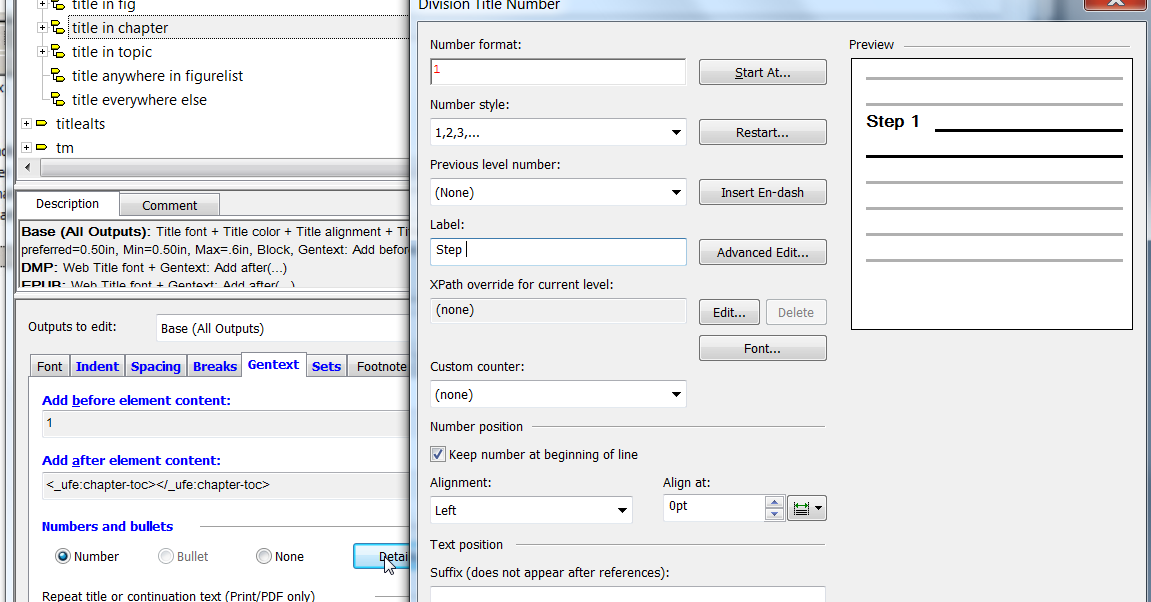
I would to have the word STEP show up before the generated chapter number. In styler, Under elements, I have found the element title in chapter, and under generated text it has add before element content the number 1. If I click on edit it brings me to the add before - title screen all that is in there is a yellow box. how do I add STEP to this, Why can I not modify the yellow box? Am I even in the right place to modify the chapter number?

Bryon
Best answer by KristerBayer

Click on details.. button and add "STEP " as a label.label.png

/Krister

1 reply

1-Visitor
October 22, 2013

Click on details.. button and add "STEP " as a label.label.png

/Krister

bfriesen18-OpalAuthor
18-Opal
October 22, 2013

Thank you, I was close to the right spot thanks for the assistance, I did find that initially and changed one instance, but it did not do anything so I changed it back. Now I went and modified all instanaces of where numbers were shown and it seems to work. One more question, now the spacing showing up in the TOC is to Close to the generated text. I have played around alittle bit and found that the spacing is set to Em-space. Should this be set to something else??

10-22-2013+9-45-51+AM.jpg

10-22-2013+9-42-01+AM.jpg

1-Visitor
October 22, 2013

I would stick to the em space for the title, but change the tab (and indent) value for the TOC itself. Go to TOC tab in the styler, select the toc, click on Format, and then Details (under indent levels). Change Follow numbers with to tab and increase the value to some em space that works for you (6em?).