

1-Visitor
June 12, 2015
Solved

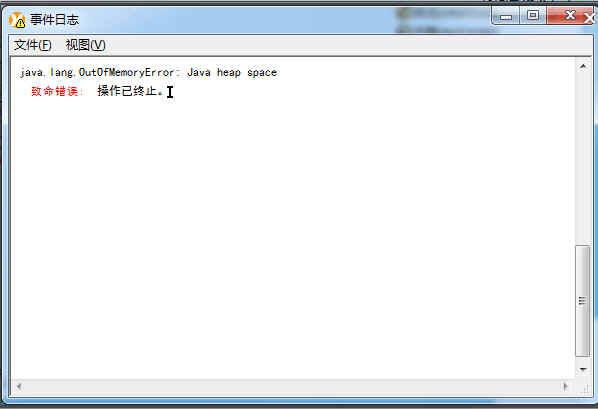
The java.lang.OutOfMemoryError: Java heap space message when pubilc the manual use Arbortext6.0

  • June 12, 2015
  • 1 reply
  • 2057 views

Dear all,

One customer meet a problem, when he public the manual use Arbortext6.0, the sytem show the following message,

Maybe it means Java virtual memory is too small? How can we solve this problem?

Thank you very much!
Snap3.jpg

Best answer by kjoono

Hi Lorin Xie

Please search 'set javavmmemory' keyword in Arbortext Help Center.

If you want apply 'set javavmmemory'. Try to insert below script into the *.acl in the 'Arbortext Installed Foler/custom/init' folder.

(If any *.acl file does not exist in the 'Arbortext Installed Foler/custom/init' folder, you try to create instance.acl file in the folder.)

function init()
{

    if (!java_init()) {
        set javavmmemory=900
    }
}

init();

1 reply

kjoono12-AmethystAnswer
12-Amethyst
June 12, 2015

Hi Lorin Xie

Please search 'set javavmmemory' keyword in Arbortext Help Center.

If you want apply 'set javavmmemory'. Try to insert below script into the *.acl in the 'Arbortext Installed Foler/custom/init' folder.

(If any *.acl file does not exist in the 'Arbortext Installed Foler/custom/init' folder, you try to create instance.acl file in the folder.)

function init()
{

    if (!java_init()) {
        set javavmmemory=900
    }
}

init();

lxie11-VisitorAuthor
1-Visitor
June 12, 2015

Hi Joon, thank you very much! I will follow your suggestion, thanks again!