

1-Visitor
June 7, 2015
Solved

The problem about the PDF bookmark

  • June 7, 2015
  • 1 reply
  • 1816 views

Hi all,


I use AE6.0, it's strange that sometime I publish PDF document using stylesheet, the PDF bookmark is not correct that I want.


In Styler, select the "Table Of Contents" tab, select the check box for "Use for PDF bookmarks"(only one of the TOC definitions with the checkbox checked, and I also select the level).

But the problem is that, I don't know why there is toc, tables, and toc(index) node. I want delete the node in the red box, but I don't which made it


Could you give me any tips please?

Thanking you!
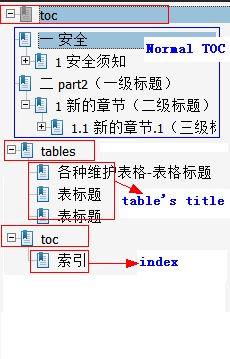
Snap1.pngI only want the Normal TOC, and delete the node for "toc", "tables(table's title)", "toc(index)"

    Best answer by rdiaz

    Hi Lorin,

    It's tough to analyze this without digging into the stylesheet itself, but it seems like the first and third entries are using the same element (toc), so if toc is checked for bookmarks, both will be included.  It may also depend on how your elements are defined in the DCF:

    http://support.ptc.com/cs/help/arbortext_hc/ae61_hc/index.jspx?id=help7729&action=show

    1 reply

    rdiaz5-Regular MemberAnswer
    5-Regular Member
    June 26, 2015

    Hi Lorin,

    It's tough to analyze this without digging into the stylesheet itself, but it seems like the first and third entries are using the same element (toc), so if toc is checked for bookmarks, both will be included.  It may also depend on how your elements are defined in the DCF:

    http://support.ptc.com/cs/help/arbortext_hc/ae61_hc/index.jspx?id=help7729&action=show

    lxie11-VisitorAuthor
    1-Visitor
    June 26, 2015

    Thank you Rafael! I will try to modify it.