

Unable to make "Side by side" effective with the styler.
In many places inside my document, I have elements like "Section, Subsection, Paragraphs etc. that have a Label g.e. (a) and a Text content. When the length of the Label differs from one element to the other, the right Text element gets misaligned. I found out that the Side by side feature would let me produce the desired result. But, setting those have no effect in the editor. I don't need this feature for exporting, only inside the editor. I have followed the steps from => https://support.ptc.com/help/arbortext/r8.3.0.0/en/index.html#page/styler/styler/help27579_3.html and never was I able to get the result. Here is a specific case with my settings. A subparagraph have a Label and a Text. Setting for my Label element (first on the left) :  Element is inline (I don't want new lines.)
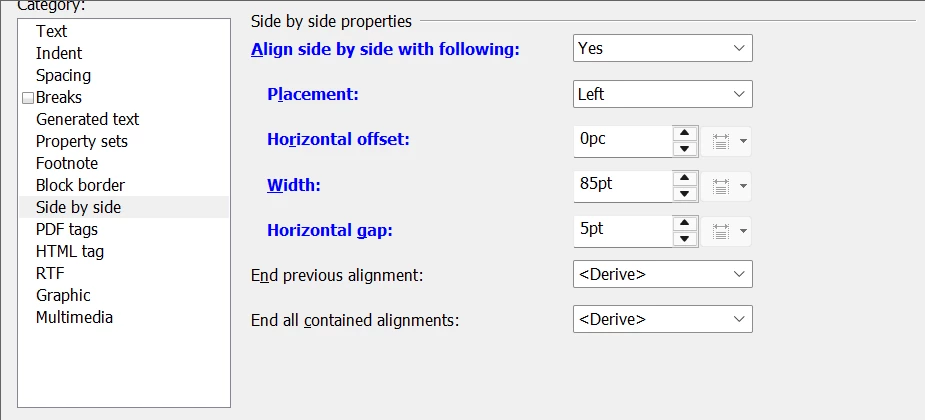 Side by side setting of Label in that context
And below setting for the right element (Text) : 
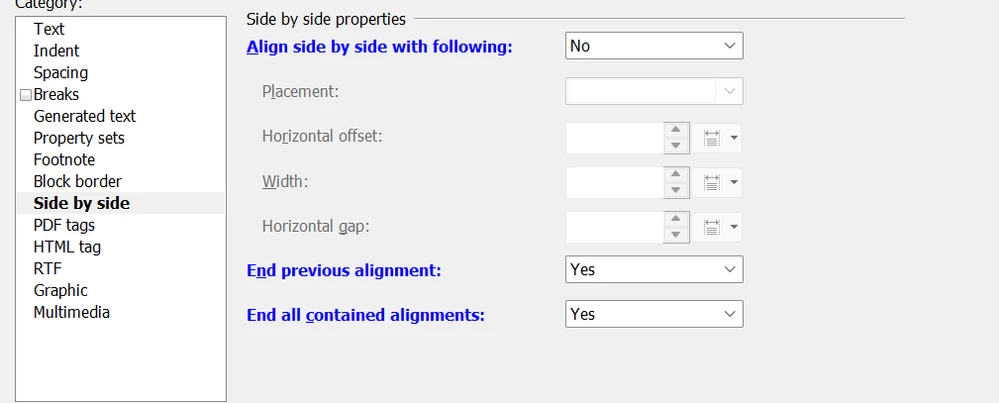
I'll need some expert help. Please let me know. And thank you.