
13-Aquamarine
February 21, 2024
Question

Windchill SSO - Arbortext PE 8.1

  • February 21, 2024
  • 2 replies
  • 1426 views

Hello,


we've setup Windchill (12.0.2.x) with SSO , and Microsoft Entra ID as the CAS and IdP, which is explained in:

Microsoft Entra ID as the CAS and IdP for Windchill (ptc.com)

This is working fine for Creo, Windchill and Arbortext.


But once SSO is enabled, publishing fails, references can't be found:
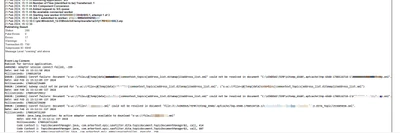
sderoose_0-1708525207017.png

Anyone faced similar issue? 


best regards,
Stijn


2 replies

15-Moonstone
March 14, 2024

Hi,

There are a few Help Center documents which may be able to help you resolve this issue.

  • Use Help Document: Configuring Workers with Trusted Host Authentication to configure Trusted Host configuration
  • Also refer to Help doc: Configuring Arbortext Publishing Engine for the Windchill Visualization Service
  • Also, try clearing the Arbortext cache using article CS143920

Best wishes

Alexia

12-Amethyst
March 20, 2024

Hello,


Have you also tried by publishing a sample document? 

Is this issue specific to an object when it's being published?

Have you checked the payloads, does it generate the PDF?


Regards,

Manpreet Singh

sderoose13-AquamarineAuthor
13-Aquamarine
April 17, 2024

Hello,


there is a PDF being generated, but some references, such as embedded screenshot, attributes, ... are missing.

Already tried the suggestions of Alexia but it didn't help. Fortunately we don't publish a lot, so if needed I disable SSO and publish the needed files.

But this is very annoying. Don't know why I don't get decent support from PTC tech support, SSO is supported and documented by PTC.


regards,
Stijn