5-Regular Member
May 4, 2026
Solved

Reading from Excel cells with several lines.

  • May 4, 2026
  • 3 replies
  • 101 views

Mathcad Prime 10.0.1 correctly read cells from Excel which includes multiple lines (<ALT>+<Enter>), displaying de read content in several lines within Mathcad.

The correct interpretation of <ALT>+<Enter> was removed in Prime 11 and 11.0.1.

Formatting the displayed way of the content of read values, without this change of lines, is impossible.

Is this correct interpretation restored in Prime 12?

Best answer by Werner_E

OK, I didn’t want to wait so i created the few line myself.

Here is a small utility function which replaces all carriage return characters (#13) in all strings contained in a Prime matrix by the character #133. Non-string valued remain untouched.

The resulted matrix can be used for display (it shows the desired line breaks) but can’t be edited (at least it can’t be copied).

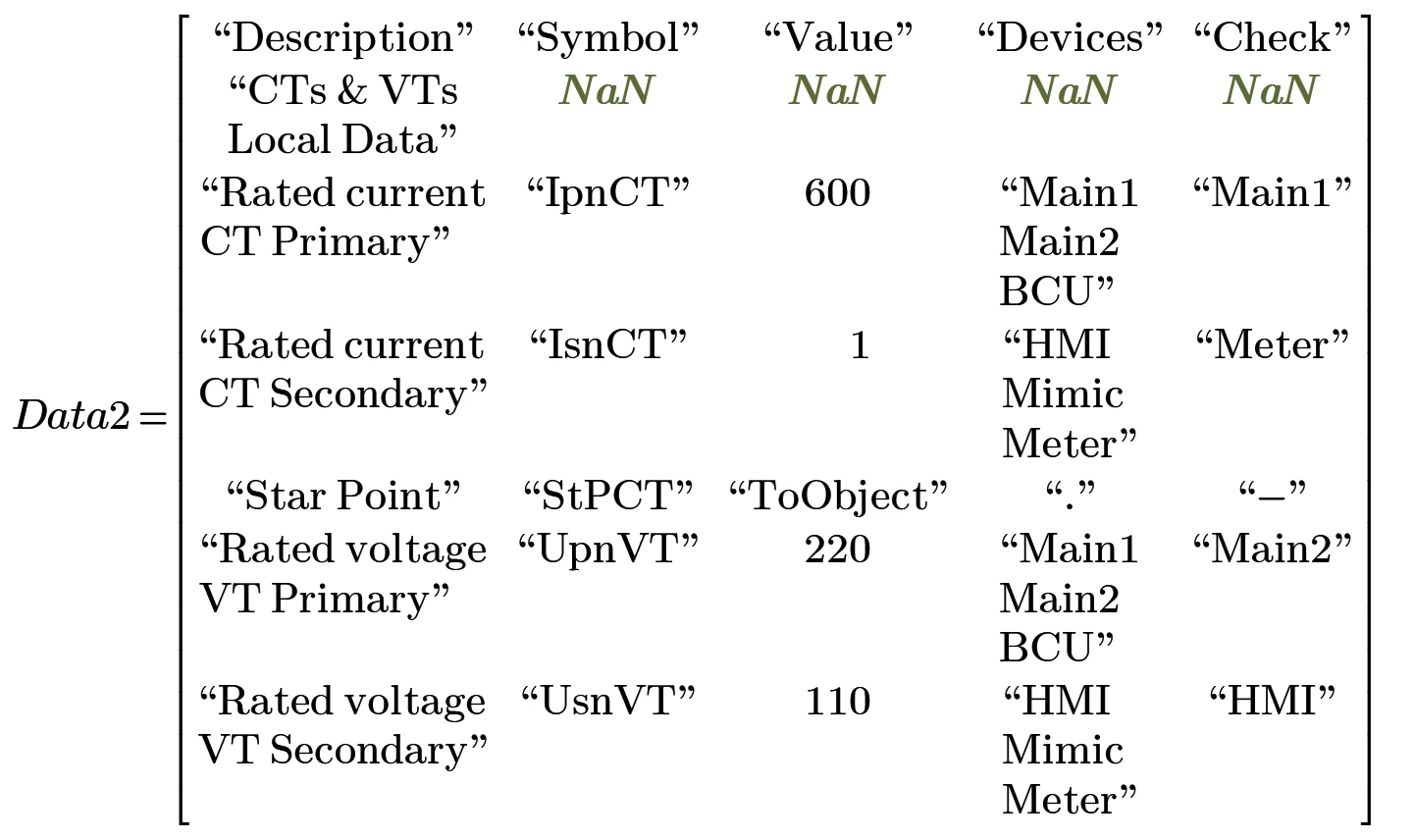
That way even Prime 11 can show a matrix like

The attached archive contains the demo Excel sheet along with the Prime sheet, which also shows how the embedded Excel sheet could look like.

Maybe ​@amcgough  can comment if the change in display of strings in Prime 11 was done intentionally or if it was a side effect of another change. And of course it would be of interest if it is planned to restore the initial way so a CR creates a multiline string in Prime again.

3 replies

amcgough
14-Alexandrite
May 5, 2026

Hi Miguel,

Thank you for this feedback - I’m not aware of a specific change here, but I’ll pass this on to our R&D and QA teams to look into. Do you have a specific example you can DM me?

Many thanks,

Andy.

25-Diamond I
May 5, 2026

@amcgough  

Hi Miguel,

Thank you for this feedback - I’m not aware of a specific change here, but I’ll pass this on to our R&D and QA teams to look into. Do you have a specific example you can DM me?

Many thanks,

Andy.

I can't be entirely sure, but it might have something to do with the change in Prime 11 regarding how carriage return characters (#13) are displayed in Prime strings:

The workaround with replacing the CR with #133 may have some undesired side effects when it comes to editing (especially the strange effect when you try to copy and paste the “test2 = ...” region)

(Sorry for the huge pics - I see no way to scale them after inserting them)


The difference in CR display behavior was already discussed some time ago among others in these threads:

https://community.ptc.com/mathcad-7/problem-report-newline-character-no-longer-works-in-a-string-168640?postid=682992#post682992

https://community.ptc.com/mathcad-7/string-issue-with-carriage-return-new-line-between-mathcad-prime-version-10-0-1-and-11-0-1-169957


Miguel_F5-Regular MemberAuthor
5-Regular Member
May 6, 2026

Thanks to both, however it is not related to text handling inside Mathcad, it is purely to maintain the multiple line formatting of the text read from Excel when displaying it in Mathcad, here the examples.

Mathcad Prime 10.0.1 and before:

Excel_Multiline-Test_10.0.1.0

Mathcad Prime 11.0.0 and higher:

Excel_Multiline-Test_11.0.0.0

Multiple line formatting is totally lost, therefore, for bigger tables with multiple lines in Excel, it is impossible to present the values in Mathcad, as whole text is in a single line and table became so wide that doesn’t fit within the page.

25-Diamond I
May 6, 2026

From what I see the problem actually IS the change in Prime 11 how text strings containing a CR (#13) are displayed.

When you read from Excel I guess the strings in your Prime matrix correctly contain carriage returns but Prime does not display these string in multilines but rather seems to ignore the CR.

You may set up a demo Prime 11 sheet along with a demo Excel sheet and I may be able to provide you with a function which replaces all CR’s by character #133 in all strings of the matrix you read in. If its just for display purpose the aforementioned side effects possibly won’t matter.  I know it's still not your desired behavior of Prime, but it might be a viable workaround.

I suggest you don’t do it here but rather in the regular Mathcad subforum - open a new thread and post your files.

But you will have to be fast doing so because my license for Prime 11 expires in two days and I'm not sure if I'll have the opportunity to renew the license.

P.S.: If your goal for reading in the Excel data is just for display purposes in Prime, you may consider to embed the Excel sheet in your Prime worksheet. This makes a much nicer display with all of Excels formatting options that Prime is not capable of.
Unfortunately Prime does not allow to embed an already existing Excel sheet. So you would have to insert an Excel component and then copy and paste the data from the already existing Excel sheet to the now embedded empty Excel sheet. Annoying, I know. Prime really should be able to embed existing sheets - maybe, some day …

EDIT: You could use “Insert Object” - “Microsoft Excel Sheet” “create from file” to insert/embed an already existing Excel sheet. Its OK for display only but on contrary to the Excel component you can’t Input or output data from it.


Werner_E25-Diamond IAnswer
25-Diamond I
May 6, 2026

OK, I didn’t want to wait so i created the few line myself.

Here is a small utility function which replaces all carriage return characters (#13) in all strings contained in a Prime matrix by the character #133. Non-string valued remain untouched.

The resulted matrix can be used for display (it shows the desired line breaks) but can’t be edited (at least it can’t be copied).

That way even Prime 11 can show a matrix like

The attached archive contains the demo Excel sheet along with the Prime sheet, which also shows how the embedded Excel sheet could look like.

Maybe ​@amcgough  can comment if the change in display of strings in Prime 11 was done intentionally or if it was a side effect of another change. And of course it would be of interest if it is planned to restore the initial way so a CR creates a multiline string in Prime again.

Miguel_F5-Regular MemberAuthor
5-Regular Member
May 7, 2026

Thanks Werner!
I need to check in detail, since that was a small example, our actual data source is much bigger, and depending on the sections we are calculating we present several subsets of the big matrix, each containing both, inputs and results of calculation inserted into the big matrix.

At the moment I think we don’t modify the texts received as inputs, they are used as guide for the reader when presenting the results inserted at the next columns, but need to check in detail on our files.

At least, as temporary workaround looks promising, I’m making myself a chaos with files that should be used only with Prime 10 instead of 11 because of printout formating.