

Add Review Hub Status Filter (Approved / Rejected / Not Reviewed) in Trackers and Reports
Currently in Codebeamer version 3.2.0.1.1, Review Hub information is available, but there is no dedicated filter in either Trackers or Reports to access and filter items based on their Review Hub status. The existing filters do not provide the ability to distinguish requirements according to their review outcome. Currently, through reports we have only the below filters
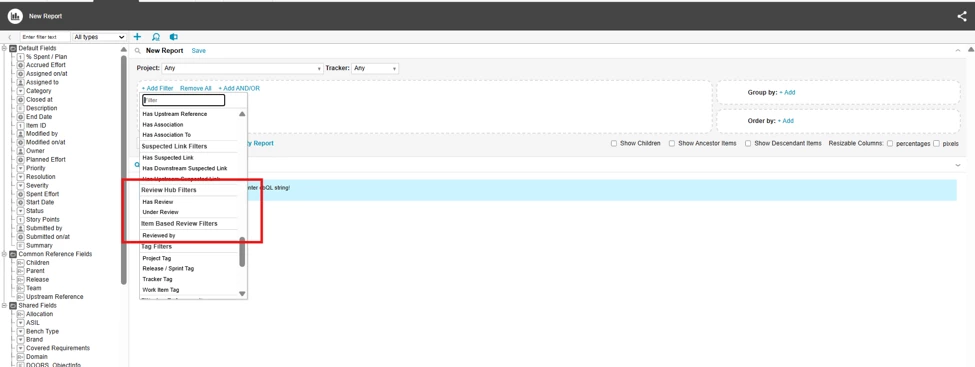
This enhancement requests the introduction of a new filter field in both Trackers and Reports that allows users to filter requirements by the following Review Hub statuses:
- Approved
- Rejected
- Not Reviewed
The enhancement should enable users to quickly identify and report on requirements according to their review state without requiring manual review or additional data processing.
Business Need
Project teams frequently need to track review progress, identify pending reviews, and generate status reports based on review outcomes. Without a dedicated Review Hub status filter, users must manually inspect requirements or create workarounds, which is time-consuming and increases the risk of reporting inaccuracies.
Benefits
- Improved Visibility: Quickly identify requirements that are approved, rejected, or still awaiting review.
- Enhanced Reporting: Generate accurate review status reports directly from the reporting module.
- Better Review Tracking: Monitor review progress and review completion rates more efficiently.
- Increased Productivity: Reduce manual effort spent searching and categorizing requirements by review status.
- Improved Decision-Making: Enable stakeholders to focus on rejected or pending items that require action.
- Consistent Data Analysis: Support dashboard creation and metrics based on review outcomes across projects.
Expected Outcome
Users can apply a Review Hub Status filter in both Trackers and Reports to easily retrieve and analyze requirements based on their current review status, resulting in more efficient review management and reporting.