
7-Bedrock
January 8, 2025
Solved

CodeBeamer: Adjustment of test step field permissions not possible

  • January 8, 2025
  • 1 reply
  • 940 views

We're currently struggling with a test case tracker configuration in CodeBeamer 22.04-SP7, where we cannot seem to change the permissions of the test step table field (see screenshot, no adjustments possible, controls greyed out/deactivated)
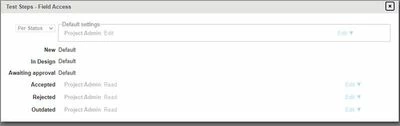
bee67e57-ac9f-4596-a15f-dc850ee7b66f.jpg.

As a result, only project admins may read/write the correpsonding field but no regular users. As we want to avoid giving all users admin priviliges, is there maybe a way to get this working? Other fields of the same tracker may be modified as usual - this only applies to the test step field.


Thanks in advance.

Best answer by TD_10768648

Thanks for the reply, we found an alternative solution that didn't require modifying configuration files. It seems that we've had a change in our users that might have led to this issue to occur in the first place. Nevertheless, creating a tracker from scratch has resolved it for us and we're able to change permissions now. 

1 reply

13-Aquamarine
January 8, 2025

Dear @TD_10768648 , 


I believe the following article will answer the above question: https://www.ptc.com/en/support/article/CS414756 

Let me know if you need additional support. 


Gabor

TD_107686487-BedrockAuthorAnswer
7-Bedrock
January 13, 2025

Thanks for the reply, we found an alternative solution that didn't require modifying configuration files. It seems that we've had a change in our users that might have led to this issue to occur in the first place. Nevertheless, creating a tracker from scratch has resolved it for us and we're able to change permissions now.