4-Participant
Nov 25, 2024 9:28 AM UTC
Solved

CODEBEAMER ADMINISTRATION

Does codebeamer can be configured with OOTB functionality to allow only project manager to have download access to the documents and restrict to others project members.? Project members are subjected to make changes in document.
12-Amethyst
Jan 24, 2025 2:39 PM UTC

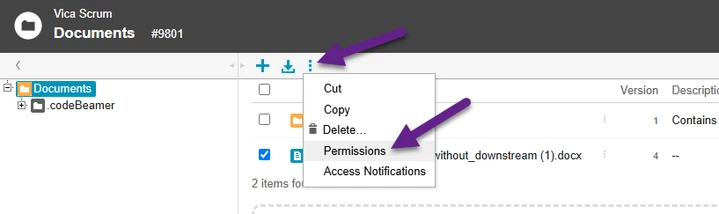
Open the Permissions page of the document:

EvaBertalan_0-1737729344090.png

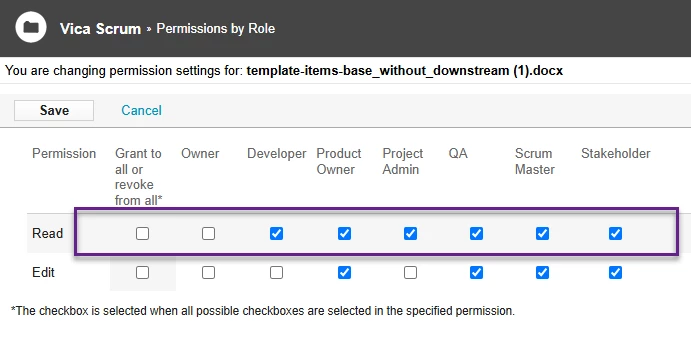
and remove the Read permission from the member's role:

EvaBertalan_1-1737729423741.png

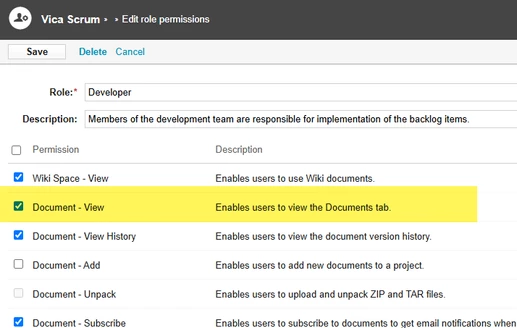
Or you can do it for every document in the project with the change of the role permission:

EvaBertalan_2-1737729554161.png


5 replies

Catalina
Community Manager
Nov 29, 2024 9:32 AM UTC

Hi @GC_11553948 

Thank you for your question. 

Your post appears well documented but has not yet received any response. I am replying to raise awareness. Hopefully, another community member will be able to help.

Also, feel free to add any additional information you think might be relevant. It sometimes helps to have screenshots to better understand what you are trying to do.


Best regards,

Translate
Catalina | PTC Community Manager
12-Amethyst
Jan 24, 2025 2:26 PM UTC

Hi @GC_11553948,


In codebeamer if a user has read permission for a document, then he/she has also permission to download it.

You can only hide the document from them if you don't want to allow downloading.

Translate
4-Participant
Jan 24, 2025 2:31 PM UTC

Dear @EvaBertalan 

Can you Please let us know how to hide the document for the users..? 

Translate
12-Amethyst
Jan 24, 2025 2:39 PM UTC

Open the Permissions page of the document:

EvaBertalan_0-1737729344090.png

and remove the Read permission from the member's role:

EvaBertalan_1-1737729423741.png

Or you can do it for every document in the project with the change of the role permission:

EvaBertalan_2-1737729554161.png


Translate