6-Contributor
July 6, 2026
Question

How to create a review for a document in CodeBeamer?

  • July 6, 2026
  • 1 reply
  • 19 views

I know how to create a review for requirements in trackers. But how can we create a review for a document in CodeBeamer? Thanks.

I uploaded a PPT file to CodeBeamer. I didn’t find the way to create a review for it.
 

1 reply

Geoffrey Clemm
13-Aquamarine
July 6, 2026

What specific functionality were you looking for in your document review?  In particular, are you looking for something like the Review functionality that is built-in to Word or Powerpoint (adding comments on specific document elements), or did you just want an overall approve/reject on the document as a whole?

6-Contributor
July 6, 2026

I just want an overall approve/reject on the document as a whole. Do you how I can do it in CodeBeamer? Thanks.

Glenda_SAI
3-Newcomer
July 6, 2026

What version of Codebeamer are you working with and do you know what tracker type is the Tracker you are uploading into? 

I am using a documents tracker type in 3.1 and this seems to work for me. I have not done any modifications to the tracker’s state transitions.

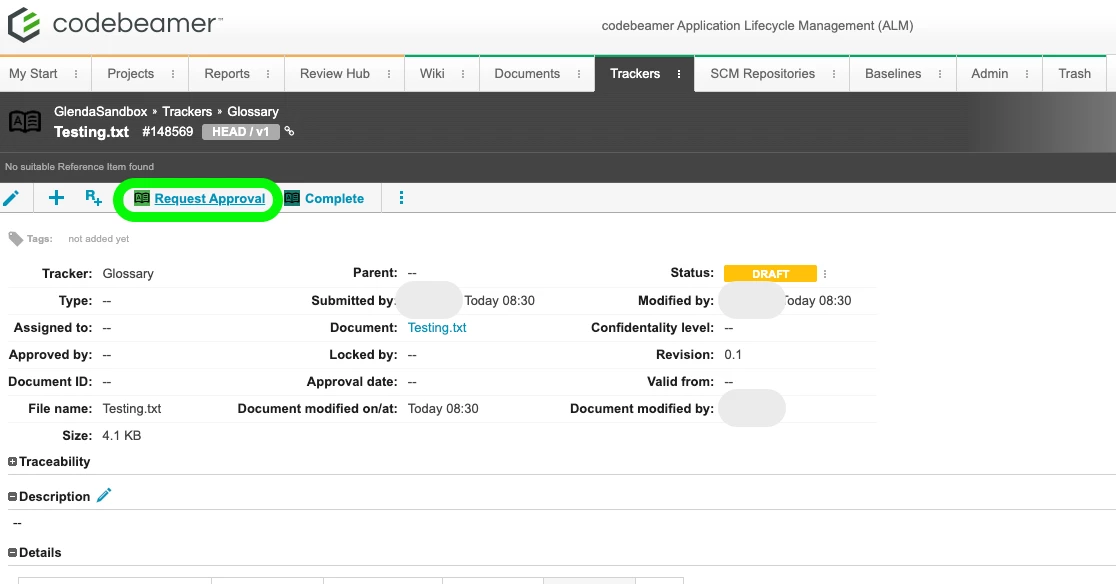
  1. Upload document to Codebeamer through the Tracker for Documents. This creates a tracker item.
  2. Click on the tracker item’s name, this opens the edit window for the tracker item. 
  3. Click on “Request Approval” 
    Screenshot of a tracker item with “Request Approval” button displayed.