
6-Contributor
October 22, 2025
Question

How to set default text format of release items

  • October 22, 2025
  • 2 replies
  • 197 views

Hi,

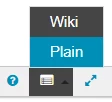
The default text format of the description of release items is "Plain". 
 

DS_10843371_0-1761136359528.png

How can I set the default format to "Wiki"? I could not find any tracker configuration or application configuration entry to address this topic.


Thank you in advance.


CB version: 2.2.1.1

2 replies

18-Opal
October 30, 2025

Hi, 


Currently, Codebeamer doesn’t provide a global or tracker-level setting to change the default description format from Plain to Wiki. Each new item defaults to “Plain” mode by Design.


The only workaround is to manually switch to Wiki after creating an item or use a tracker template that already contains a Wiki-formatted description field; new items cloned from that template will retain the Wiki format.


This behaviour has been raised before as a usability improvement request, so it’s worth submitting feedback through PTC-Support if you’d like to see it made configurable in future versions.


Thanks,

Community Manager
October 31, 2025

Hello @DS_10843371,


It looks like you have a response from our community champion. If it helped you solve your question please mark the reply as the Accepted Solution. 
Of course, if you have more to share on your issue, please let the Community know so other community members can continue to help you.

Thanks,
Vivek N.
Community Moderation Team.