
5-Regular Member
April 24, 2024
Solved

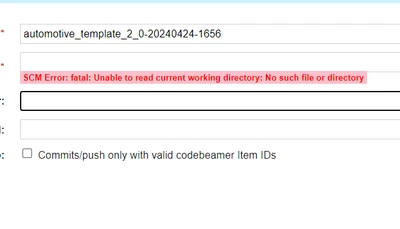
I am able to clone all git files locally but from codebeamer i get an error

  • April 24, 2024
  • 1 reply
  • 991 views

Hello


I am  able to Integrate Git with Codebeamer am able to clone all git files locally but from codebeamer I get


I am using CodeBeamer 22-10 LTS and github.com is GIT Repository


My codbeamer url is http and my git is https .Is this a reason for that .I selected  Use an existing repository option
 

shrinivas_1-1713958032881.png


Best answer by AndrasJ_hu

Hello @shrinivas,

If you have access to codebeamer.com Wiki pages, please follow the GitHub Webhook settings and try function again.

Link to the GitHub Webhook Wiki: https://codebeamer.com/cb/wiki/3825088

When you have still experience issues with Git settings, you can raise an incident case in our eSupport Portal: https://www.ptc.com/en/support/

Thank You.

1 reply

12-Amethyst
May 30, 2024

Hello @shrinivas,

If you have access to codebeamer.com Wiki pages, please follow the GitHub Webhook settings and try function again.

Link to the GitHub Webhook Wiki: https://codebeamer.com/cb/wiki/3825088

When you have still experience issues with Git settings, you can raise an incident case in our eSupport Portal: https://www.ptc.com/en/support/

Thank You.

Community Manager
May 30, 2024

Hi, shrinivas,


Did the suggestion to follow the GitHub Webhook settings help resolve your issue?  If so, please mark the reply by Andras as an Accepted Solution.


Thank you,


Jaime Lee

Senior Online Community Manager