
1-Visitor
January 23, 2024
Question

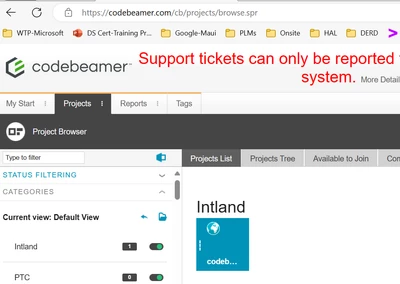
In Codebeamer Web UI , I am not able to find + icon for project creation In Project Explorer

  • January 23, 2024
  • 4 replies
  • 992 views

In Codebeamer Web UI , I am not able to find + icon for project creation In Project Explorer,


Does i need to have any specific role for this.  Advance thanks for your help.
 

RD_10592613_1-1705989170981.png


4 replies

5-Regular Member
April 11, 2024
Status changed to: New Idea

Hi @RD_10592613 

We do not have a Codebeamer Support Community yet. You can contact the Codebeamer TechSupport team using the eSupport portal as well. Create a case and we are ready to help you: https://support.ptc.com/apps/case_logger_viewer/cs/auth/ssl/log
Catalina
Community Moderator
July 16, 2024

This topic has been moved from the "Codebeamer Ideas" to the "Codebeamer" forum due to its non-idea nature and in order to receive the visibility needed. 


Thanks,


Catalina | PTC Community Moderator
14-Alexandrite
July 18, 2024

Hi @RD_10592613 , the permission to create projects on https://codebeamer.com is probably not granted to all users. If you want to experiment / create a project usable by others, you may use https://trial.codebeamer.com/

12-Amethyst
July 19, 2024

I usually check 3 things on tracker configuration in this case:

- item creation perm is granted for user's role on Permissions page

- role has edit perm on all fields which is mandatory on Submit status (Fields page)

- role has the perm to execute the Submit action (State transitions page)


If all of these are granted, add item will be possible.