
4-Participant
October 28, 2024
Solved

Issue with REST API Returning Modified Text in Item Description
  • October 28, 2024
  • 1 reply
  • 614 views

_11616217_3-1730093039577.png


Hello,

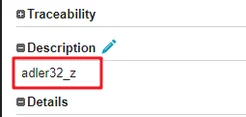
I've encountered an issue with the REST API where the description of a requirement item is returned incorrectly when retrieved via API call. After entering "adler32_z" into the description of an item and saving it, I used the REST API to fetch the item's details with the following GET request: GET /api/v3/items/%item_id%/fields.

Expectedly, I hoped to see "adler32_z" as the value of the Description field. However, the response returned "adler32~_z" instead. Here is the response I received:
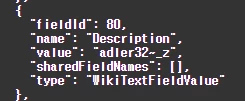
 

_11616217_2-1730092788224.png

This issue appears to be specific to descriptions containing "adler32", as other descriptions seem to be fetched correctly. Could you please help me understand why this alteration in the text is happening? Is there a specific parsing or encoding rule that might be affecting text containing "adler32"?

Thank you for your assistance.

Best answer by alfonso_c

Hello @현전_11616217 , the tilde ( ~ ) is for escaping, you can find the full list of escaped chars at the Escaping page.


Currently, there are no direct methods to remove the tilde, you can find some potential approaches at CS401389 - Extracting plain text from Codebeamer Wikitext fields is not possible through REST API

1 reply

alfonso_c14-AlexandriteAnswer
14-Alexandrite
October 31, 2024

Hello @현전_11616217 , the tilde ( ~ ) is for escaping, you can find the full list of escaped chars at the Escaping page.


Currently, there are no direct methods to remove the tilde, you can find some potential approaches at CS401389 - Extracting plain text from Codebeamer Wikitext fields is not possible through REST API