12-Amethyst
June 5, 2025
Solved

Shared resources across multiple projects

  • June 5, 2025
  • 3 replies
  • 998 views

Hello Community,

is it possible in Codebeamer to share resources across multiple projects?

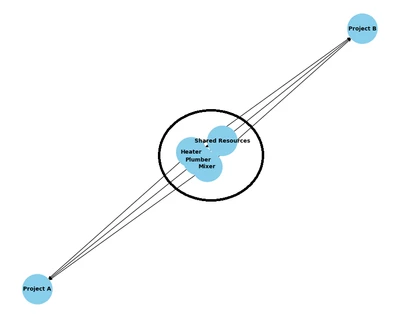
I have two projects in Codebeamer which use the same machines for tasks like mixer, heater, plumber, etc.

I want to avoid to define machines in both (or more) projects, so looking for a way how to place them in one place and share it across projects.

Additionally change for resource in Project A will be visible also in shared resource and Project B and vice versa.
 

MM_10991077_1-1749126463404.png


thank you

Best answer by GeoffreyClemm

You can find more details in the following post: https://community.ptc.com/t5/Codebeamer/Report-a-Bug-in-a-Project-Different-from-the-Executing-Test-Run/m-p/1024211#M870


3 replies

Catalina
Community Moderator
June 10, 2025

Hi @MM_10991077 


Your post appears well documented, but ha snot received any comments yet. I am replying to raise awareness.


Additionally, feel free to add any other information that you think it may be useful.


Best regards, 

Catalina | PTC Community Moderator
13-Aquamarine
June 10, 2025

You can create cross-project references to the items you want to share, and when you change the shared item, you will see those changes whenever you navigate those references (either in the GUI or in Reports).

12-Amethyst
June 19, 2025

Hello Geoffrey,

thanks for feedback.

Can you please share steps how to create a cross-project references to the items?

13-Aquamarine
June 19, 2025

When you configure a reference field, you identify what items that field can refer to.   In this configuration, you can select trackers in different projects that this field is allowed to refer to.

GeoffreyClemm_0-1750338265501.png


3-Newcomer
July 24, 2025

It sounds like what you are trying to accomplish is to create a common list for a specific field to be reused on multiple projects? If this is the case we created a project specific for housing these "Global Component Lists" that can be selected from.


For each field that you want to create a pick list for you create a component tracker and populate that tracker with the items you want to be able to select.


Then create your choice fields in the two projects and make them related to the same component tracker in your meta data project.


12-Amethyst
July 31, 2025

Hello MR,

yes, this is also the option how to accomplish that.

Thank you for your input.