The toolbox “MATLAB Modelling Connector” (MMC) does not support Codebeamer Streams which is utilized by pure::Variants (pV) for product line engineering (PLE).
The concept of pure::Variants is to use a “main” or “initial” stream for the 150% platform development and create a stream based of this stream for a 80% to 100% variant.
Since all tools (MMC, pure::Variants and CB) are developed by PTC, the following use cases on the variant stream should be supported by MMC:
Requirement is created (f.e. variant specific functionality, that was deemed to be not relevant for the platform)
Requirement is modified (f.e. functionality/implementation is changing late in the project)
Requirement is deleted, since it is not applicable to the variant
Modifying Implementation (Moving or deleting links in the Model, without changing the requirements)
I tried to perform those use cases and these are my observations.
Requirement is created:
MMC does not seem to support creating links to Requirements on a Stream different to the "Initial Stream".
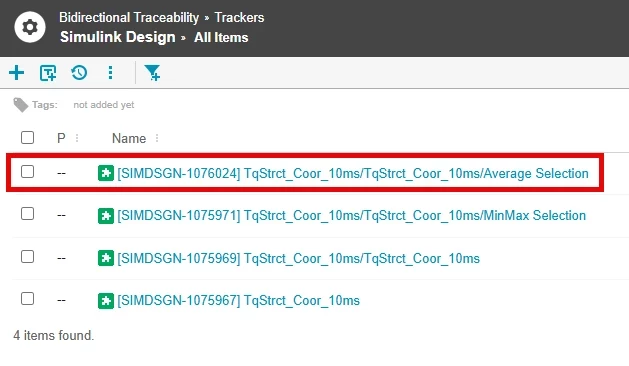
1. Create Requirement on Stream:
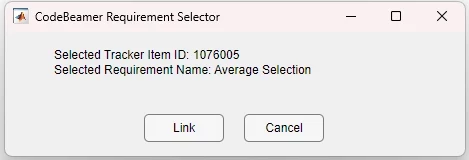
2. Modify Model and Link to Requirement:
3. Publish Links
Furthermore, performing these actions leads to an inconsistent state in Codebeamer.
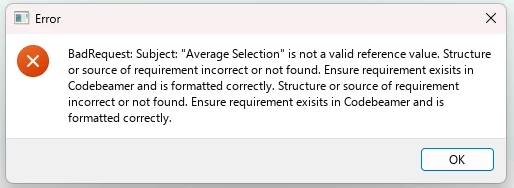
After deleting the link to "Average Selection" in MATLAB (.slmx file) and publishing again, the following error occurs:
I found out that the plugin already created the proxy item in Codebeamer (but in the "Initial Stream" and not in the "Variant Stream").
After deleting the proxy item, publishing links was successful again.
Requirement is deleted:
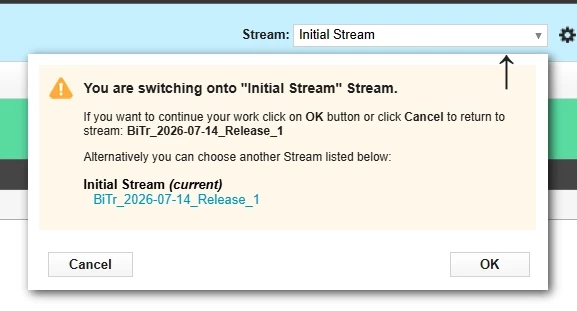
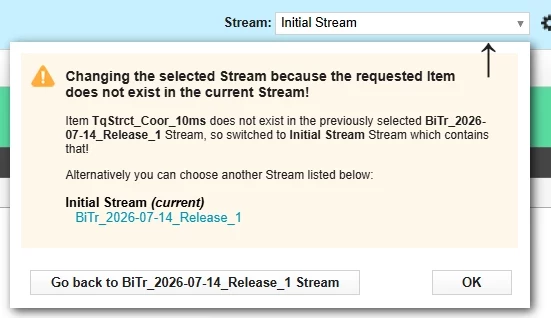
When clicking the link of a deleted requirement, the requirement is shown as it exists on the "Initial Stream".
If the last active Codebeamer tab is configured to the "Variant Stream", the user is asked if they want to switch to the "Initial Stream".
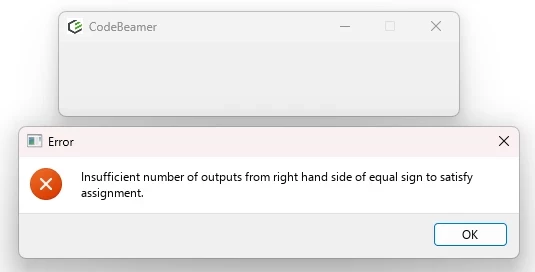
Upon clicking Cancel, the user is informed that the requirement doesn't exist on the currently selected stream:
This only works if the user already pre-selected the correct stream in Codebeamer.
This is prone to errors and a lot of clicking when navigating a Variant.
The functions "Check Requirement Consistency" / "Publish Link" only pick up deleted Requirements on the "Initial Stream" do not support Streams at all.
Since MMC always queries the "Initial Stream", deleted requirements are not considered.
Requirement is modified:
When clicking the link of a modified requirement, the behaviour is similar to a deleted requirement, but upon Cancel the user gets redirected to the Requirement of the stream.
Again, this only works if the user already pre-selected the correct stream in Codebeamer.
The function "Check Requirement Consistency" only picks up changes if the requirement was changed on the "Initial Stream"
Since MMC always queries the "Initial Stream", modified requirements are not considered.
Modifying Implementation
If the implementation is changed based on the Variant development it might be necessary to move or delete existing links and provide new ones (f.e. splitting a subsystem into two different subsystems).
Since MMC always queries the "Initial Stream", the function "Publish Links" would make changes to the "Initial Stream" instead of the "Variant Stream".
There could be numerous errors, like trying to link to a requirement that does not exist on the "Initial Stream" or falsely linking to platform requirements.
---
Release Management:
As part of a Release of a specific product variant we want to "freeze" the development inside Codebeamer.
Codebeamer offers the concept of baselines which is also supported by Codebeamer Streams.
However, the link created with MMC does only point to the item ID and does not take a baseline into account.
This means the user would then have to select the stream and the baseline to be able to view the requirement linked to the simulink artifact when viewing an implementation as of the release.
This would be a lot of clicking when doing f.e. a Release-Review and prone to errors.
---
REQUEST:
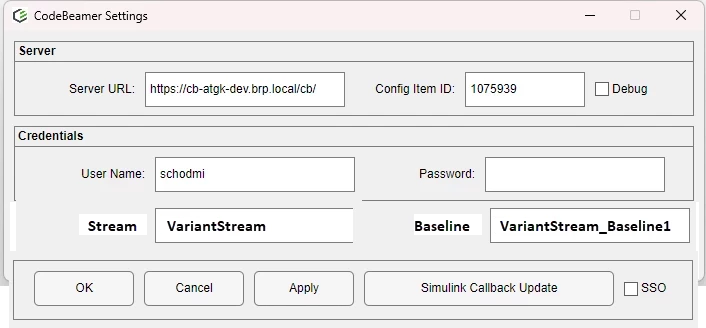
My request is that MMC supports the context of a stream selected in Codebeamer for Variant Management.
Additionally I would like to be able to select a baseline of a stream that exists in Codebeamer for Release Management.
This could be done f.e. by a selection in Simulink->Tools->Codebeamer->Settings:
I also want to be able to set the context (stream and baseline) programmatically to prevent users from selecting the wrong context. Setting the stream programmatically could also be done by pure::Variants after creating the stream.
Please note that above is just a suggested solution.
First, I wanted to say it looks like the structure of your post is very good!
I just wanted to let you know it is a little difficult to follow what errors you are experiencing and what steps you are following. The images are not displaying correctly. If you can correct those, that should help you get more clear and efficient assistance! Thanks!
Absolutely! They’re not displaying for me in the main post, I can see only the words “image.png”. They are displaying correctly in the screenshot you added in the reply here.
Translate
Windchill Satisfaction Survey
Help shape the future of Windchill. Take our 5-minute survey and share your feedback.