1-Visitor
January 19, 2016
Solved

Angle measurement

  • January 19, 2016
  • 1 reply
  • 4912 views

I am using the Measure tool to measure a sharpe angle between to surfaces, such as below picture shown, I thought the measurement result should be 60 degrees, but it turns out that the result is 120 degrees, I understand that the result Creo measured are from two perpendicular surfaces instead of the surfaces I measured, I can get the 60 degrees esult I want from some calculation, but it really annoying some times, especially if I need to take some picture to shown the measurement result to other people, every time I had to explain about this, I'd rather it give me a 300 degrees result, so that I can tell people that I am measuring the an obtuse angle between the two surfaces,   anyone can help on this? Thanks very much.
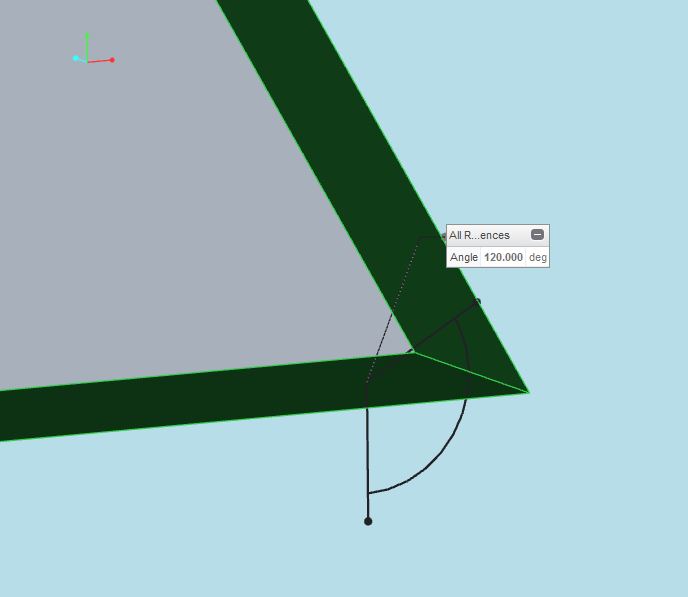
angle measurement.JPG

    Best answer by CoreySusie

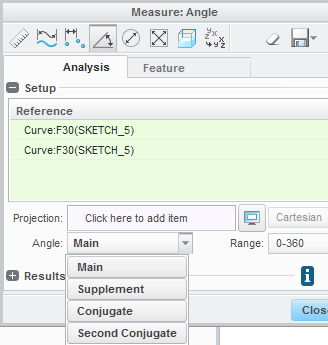
    Expand the analysis tool and utilize the "angle" selection to measure alternative angles using those references.  (Main, Supplement, Conjugate, Second Conjugate)

    angle_measure.png

    1 reply

    1-Visitor
    January 19, 2016

    Expand the analysis tool and utilize the "angle" selection to measure alternative angles using those references.  (Main, Supplement, Conjugate, Second Conjugate)

    angle_measure.png

    zli-31-VisitorAuthor
    1-Visitor
    January 20, 2016

    Thank you Corey, it helped.  Don't know there's a "Plus" that can espand the analysis tool before.Maybe I should find another book to study it again.

    1-Visitor
    January 20, 2016

    You can actually set a config.pro option to have it expanded by default measure_dialog_expand set to yes