1-Visitor
August 2, 2016
Solved

Arrow creation

  • August 2, 2016
  • 2 replies
  • 9938 views

hi,

I am new user of creo software. I wanted to know how to draw  a double sided arrow without dimensions. I need it to add a note.it would be very much helpful if reply soon to my problem.

regards

sharath

    Best answer by svillafuerte

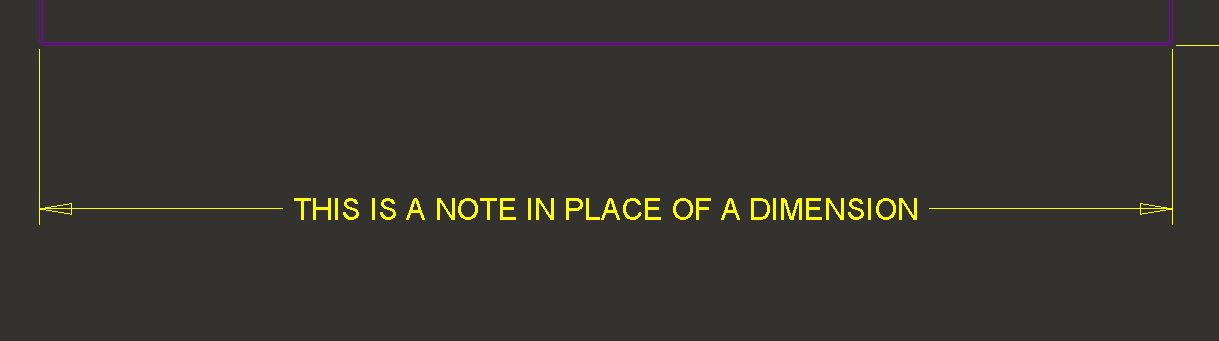
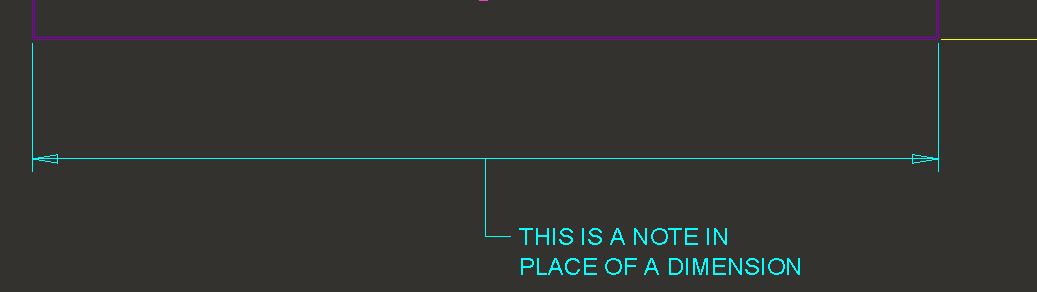
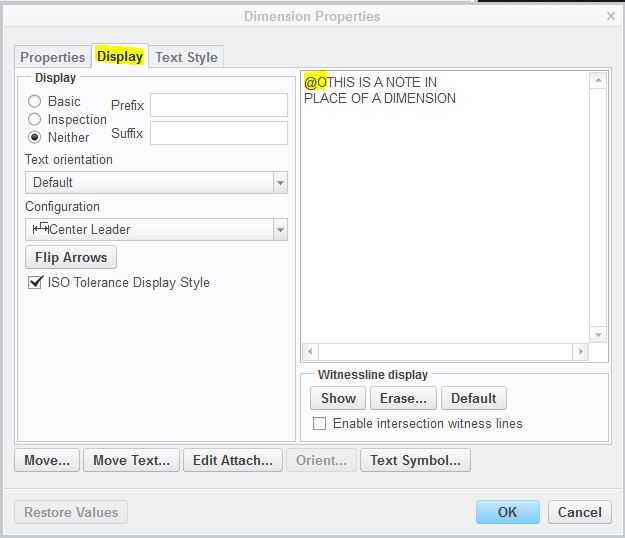
    If this is what you are talking about, all you have to do is create a dimension and then go into the dimension properties and go to the "Display" tab and change the @D to @O (Capital O and not zero) and then type the note you want to display. Then you can change how it looks an appears on the drawing in this dialog box as well. Then once out of the dialog, you can drag the note where you would like it to be. Hope this is what you are after.

    NOTEDIM1.JPG

    NOTEDIM2.JPG

    NOTEDIM3.JPG

    DIM TEXT PROPERTIES.JPG

    2 replies

    24-Ruby III
    August 3, 2016

    Hi,

    1. create note with leader
    2. select the note
    3. move mouse cursor to arrow end of leader
    4. press right mouse button
    5. use Arrow Style ... command to set Double Arrow

    Note: The above procedure is valid for CR2.

    MH

    ss-10-111-VisitorAuthor
    1-Visitor
    August 3, 2016

    Hi Martin,

    Thanks for the reply, but its not working .when I select the arrow I am not getting the arrow style option.

    In the arrow style I don't have the 2 sided arrow head option. Kindly let me know how to represent the note in this manner in creo drawing.

    Regards

    Sharath

    Arrow note.PNG

    1-Visitor
    August 3, 2016

    If this is what you are talking about, all you have to do is create a dimension and then go into the dimension properties and go to the "Display" tab and change the @D to @O (Capital O and not zero) and then type the note you want to display. Then you can change how it looks an appears on the drawing in this dialog box as well. Then once out of the dialog, you can drag the note where you would like it to be. Hope this is what you are after.

    NOTEDIM1.JPG

    NOTEDIM2.JPG

    NOTEDIM3.JPG

    DIM TEXT PROPERTIES.JPG

    ss-10-111-VisitorAuthor
    1-Visitor
    August 4, 2016

    It working.. thanks a lot shane.