
1-Visitor
October 25, 2011
Solved

Boundary blend curvature going backwards :-(

  • October 25, 2011
  • 4 replies
  • 2664 views

Hi

I have an interesting one today. My boundary blend almost works, but when I apply curvature this happens...
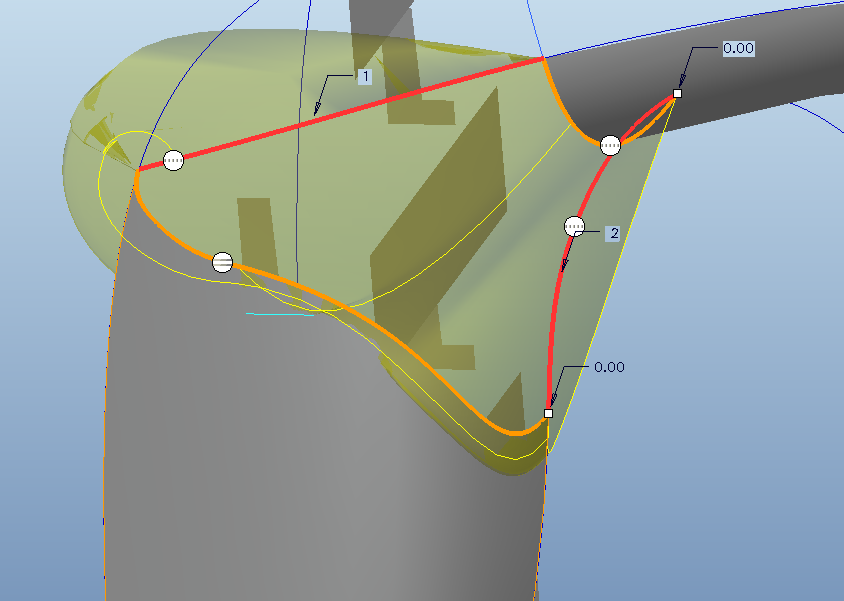
backwards.png

For reference, it should look like this:
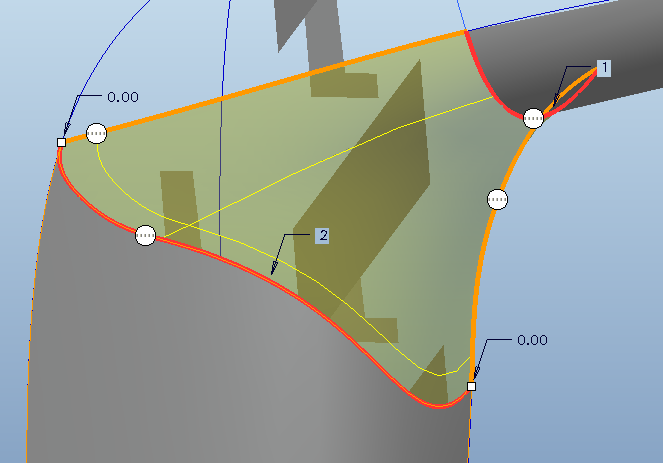
forwards.png

It just flips over when I apply teh curvature connection. Can anyone help?

Thanks

    Best answer by Jacek_Mydlikows

    be aware every lack of contunuity in your curves - i.e extra points, curves which consist of several pieces will invoke problem with tangency like the one introduced by you. it better to use splines, conics are, single elements for curve

    anyway - creo gives you control over the direction of created automaticaly tangency

    in dashboard of boundary blend tool swith to Constraints tab, and next pick Display Drag Handles.

    As a result control arrows will be displayed with default value 1. please pull this arrow to invert tangency direction or simply change value to -1

    4 replies

    14-Alexandrite
    October 25, 2011

    Hello David,

    Can you add your model for download and check the curves.

    Vladimir

    17-Peridot
    October 27, 2011

    Will you share it

    17-Peridot
    October 27, 2011

    Will you share it

    1-Visitor
    October 27, 2011

    be aware every lack of contunuity in your curves - i.e extra points, curves which consist of several pieces will invoke problem with tangency like the one introduced by you. it better to use splines, conics are, single elements for curve

    anyway - creo gives you control over the direction of created automaticaly tangency

    in dashboard of boundary blend tool swith to Constraints tab, and next pick Display Drag Handles.

    As a result control arrows will be displayed with default value 1. please pull this arrow to invert tangency direction or simply change value to -1