16-Pearl
April 13, 2017
Solved

Circle Centerline

  • April 13, 2017
  • 2 replies
  • 8661 views

I am sure this has been asked to death.

And I should know the answer to this by now.

But I'm gonna ask again.

Is there a way to get a circle centerline to show in Creo 3?

I have been using cosmetics and hiding on layers.

WayneF

    Best answer by StephenW

    Yes...IF...

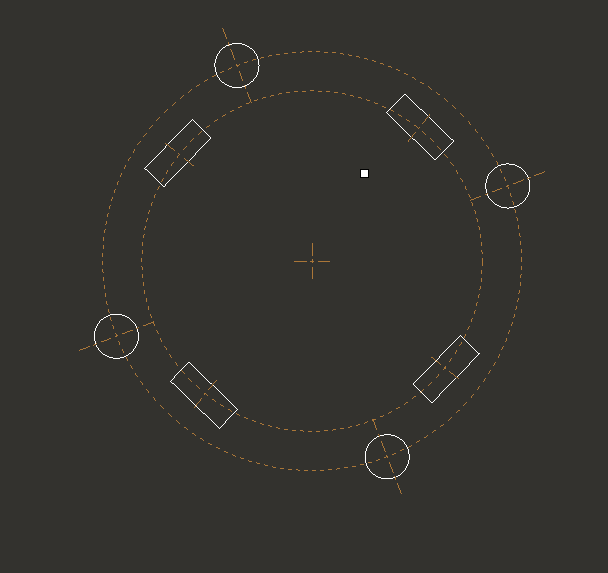
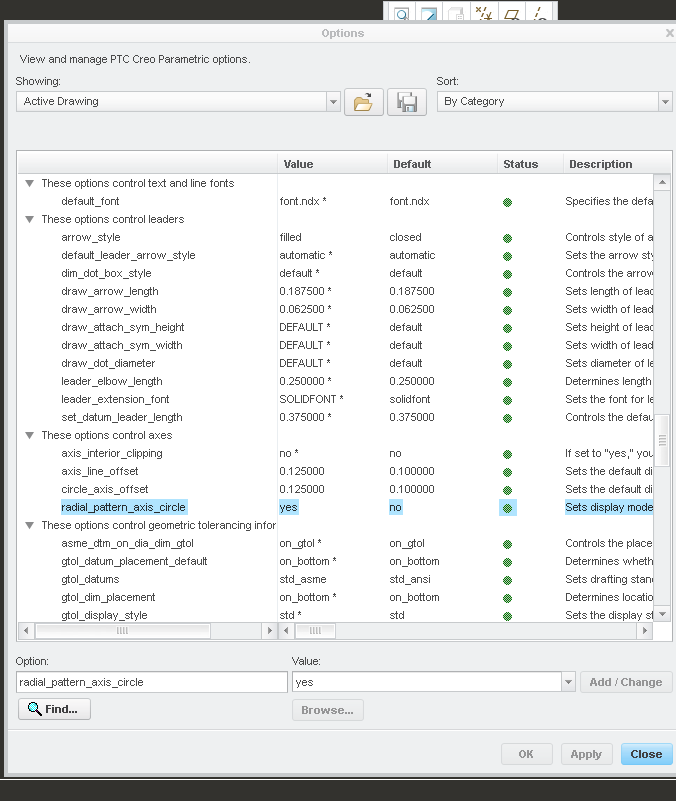
    If you use an AXIS pattern to create your slots AND you have the drawing setup option radial_pattern_axis_circle turned on

    And I added an axis to the slot sketch

    2 replies

    StephenW23-Emerald IIIAnswer
    23-Emerald III
    April 13, 2017

    Yes...IF...

    If you use an AXIS pattern to create your slots AND you have the drawing setup option radial_pattern_axis_circle turned on

    And I added an axis to the slot sketch

    wfalco16-PearlAuthor
    16-Pearl
    April 13, 2017

    Stephen...NICE. I tried on new geometry. Works as advertised. Unfortunately I am documenting someone else's model and they used 1 feature to extrude. I don't know if I want to redo the geometry. But I will keep this in my bag of tricks. Thanks!!!

    Wayne

    24-Ruby III
    April 13, 2017

    Hi,

    I think you can cheat little bit ... to add the pattern of datum axis or datum points to get circle centerline.

    MH

    wfalco16-PearlAuthor
    16-Pearl
    April 14, 2017

    I ended up redoing as patterns. Worked out nice. Thanks Stephen.