1-Visitor
October 8, 2014
Solved

Configuring Dimensional Tolerances

  • October 8, 2014
  • 1 reply
  • 1584 views

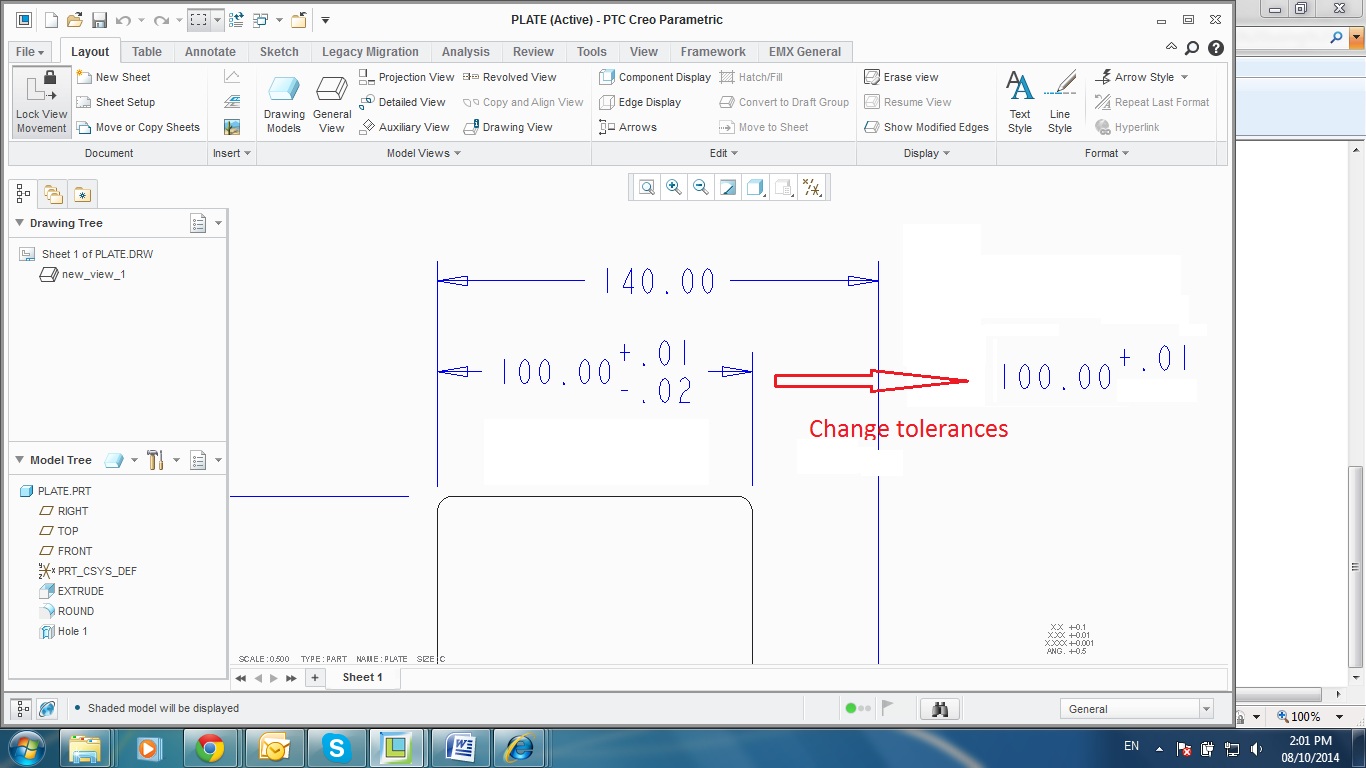
How to change dimensional Tolerances as picture ?

Untitled3.jpg

Plz help

    Best answer by MartinHanak

    Hello,

    if lower tolerance value = 0, then you can hide it on the drawing.

    • click File > Prepare > Drawing Properties
    • click change in Detail Options line
    • set blank_zero_tolerance yes

    Martin Hanak

    1 reply

    24-Ruby III
    October 8, 2014

    Hello,

    does this mean that lower tolerance value = 0 ?

    Martin Hanak

    24-Ruby III
    October 8, 2014

    Hello,

    if lower tolerance value = 0, then you can hide it on the drawing.

    • click File > Prepare > Drawing Properties
    • click change in Detail Options line
    • set blank_zero_tolerance yes

    Martin Hanak

    ttathanh1-VisitorAuthor
    1-Visitor
    October 8, 2014

    Correct ! Thank you very much.