1-Visitor
September 25, 2015
Question

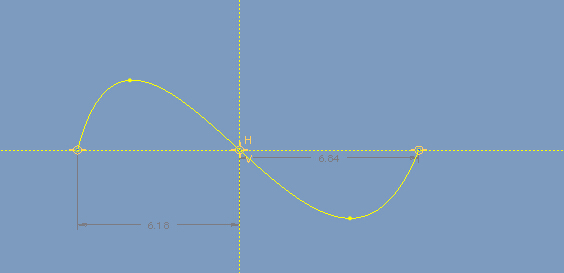
Could you help me on how to make a midpoint in spline of the sketch?

  • September 25, 2015
  • 2 replies
  • 5466 views

proe1.jpg

    2 replies

    17-Peridot
    September 25, 2015

    You've tackled a good oversight on the PTC programmers part.

    We "should" be able to manage spline nodes with ease, but NO!

    I have had need to manage this and it is not impossible.

    Create points along a line with the ratio (relative distances) along the spline that you want.

    Create the spline along these points creating a straight line.

    Now you can manipulate the spline to your heart's content knowing the nodes will remain in their relative position along the spline.

    If there is a better way, I am all ears.

    Also remember that you can manage curvature and angle of the spline by creating their dimensions in the sketch.

    yhao1-VisitorAuthor
    1-Visitor
    September 26, 2015

    Thank you for your replying,and i am very sorry for the late replying.

    It could be a possible if i just want to make a midpoint that is half the radio of the postion of the spline,but

    what i want another is to make a midpoint that is half of the length of the spline,how? I had tried to make a

    reference by adding a midpoint ,which made me put it into prt working,and establishing another sketch to draw the

    same spline through "use" and "divide" ,but after that way i can't select the midpoint reference.Also i tried put it

    into the styling ,and disabled again.So the next question come up ?Whether it necessary or not,it is hard that

    divide the spline into several equal part?I am curioused about that why not put the constraint into it,as the geometry point is,

    or add a dialog box which is like the datum point tool that  the information of the point in

    it.If the x and y postion are enough?

    Also i think the angle you told about,but is the angle specific value or just probable?I don't know how to make a specific angle.

    Looking forward your replying.I am just learning it.

    Thank you very much!

    ps:If there are any problems in my English grammar and statement ,please tell me!Also i am learning it.☺

    yhao1-VisitorAuthor
    1-Visitor
    September 28, 2015

    Thank you for your reply.

    I know it is easily to get the midpoint in the PRT mode,but the information about the length of the spline may given at the same time for it could create the midpoint through the Datum Point Tool, which may create the midpoint by line fitting ,and that would calculate the length first,  the reason why i do this is that ,have you ever played the game skipping it?When we control the beginning and ending points of the rope(spline),the midpoint of the straight line which connect two points would not changed,but the midpoint of the rope(spline) was changed.And that is I want!sketch mode04.jpg

    17-Peridot
    September 28, 2015

    I will try to make a video of the curve control you do have.

    There are two methods to manage splines.

    I only learned you can put an angle to interim nodes recently.

    If you are looking for a true sine wave, use the equation datum curves.

    17-Peridot
    September 29, 2015

    The video shows the non-polygon mode of managing a spline in a sketch.  You manage the symmetry and the node remains centered.

    From what I understand for your purposes, consider patterning 1/2 of the spline by rotating it.