1-Visitor
December 23, 2013
Solved

creo elements/pro 5.0 M200 refuses to show my language

I have

1. installed the language pack

2. changed the emvirmental variable (both LANG & PRO_LANG)

3. added "ENV=PRO_LANG=chs" to the end of the pro1.psf file

4. used command line like

set LANG=chinese_cn

"D:\Program Files\PTC\Creo Elements\Pro5.0\bin\proe.exe" "D:\Program Files\PTC\Creo Elements\Pro5.0\bin\proe1.psf" %*

5.modified the following options msg_translation' & "menu_translation

6. restarted the computer

7. or even restalled the application (the setup shows the correct language, though)

Unfortunately, nothing does the trick.

Any idea?

Thanks.

16-Pearl
December 23, 2013

OK, but that only shows that you have this license available. I asked if you have configured Elements/Pro to actually run with this license, as shown (sorry, if this is a trivial question, but sometimes you can just miss something basic )

creo_licenses.png

5 replies

16-Pearl
December 23, 2013

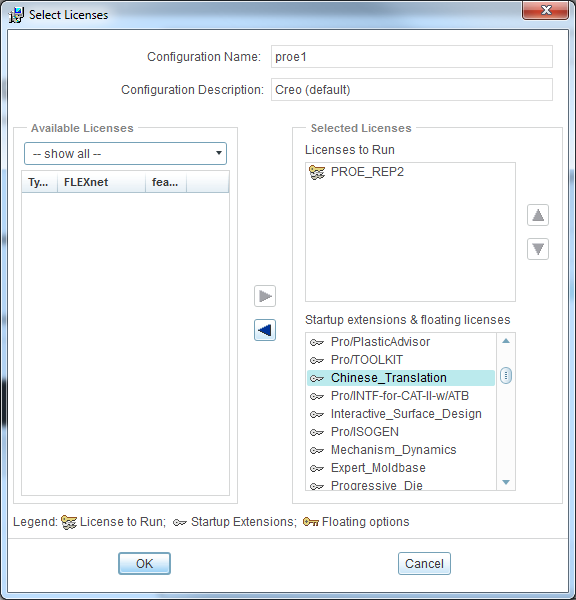
Have you also configured license to add Chinese_Translation to startup extensions? I actually never had to run Elements/Pro in Chinese, but I have seen there is this license option when you configure licenses, so maybe that's the problem?

Translate
1-Visitor
December 23, 2013

Hi Lukasz,

Thank you for the quick reply.

Yes, the Chinese_Translation option is available in the the list from the ptcsetup.bat, as shown below.

Am I missing anything else?

chs.JPG

Translate
16-Pearl
December 23, 2013

OK, but that only shows that you have this license available. I asked if you have configured Elements/Pro to actually run with this license, as shown (sorry, if this is a trivial question, but sometimes you can just miss something basic )

creo_licenses.png

Translate