

1-Visitor
August 8, 2013
Solved

Customize ribbon flyouts or "icon splits"

  • August 8, 2013
  • 1 reply
  • 1482 views

How does one move ribbon commands that reside in a flyout menu or "icon split"? I can't seem to move the "paste special" command. I know I could add it to the quick access bar but I simply want to show it on the main ribbon.
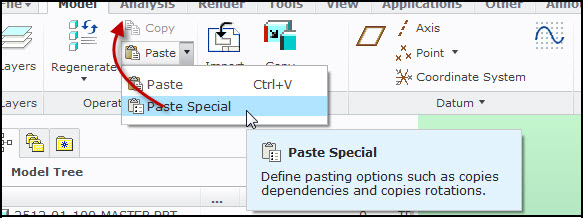
8-8-2013+2-22-59+PM.jpg

    Best answer by TomD.inPDX

    You cannot modify the default tabs so you would have to make your own Model tab, hide the original, and you can customize to your heart's content. Or you can just make a "My Tab" tab and add the commands you want.

    1 reply

    17-Peridot
    August 8, 2013

    You cannot modify the default tabs so you would have to make your own Model tab, hide the original, and you can customize to your heart's content. Or you can just make a "My Tab" tab and add the commands you want.

    MGortner1-VisitorAuthor
    1-Visitor
    August 9, 2013

    Thanks. That's unfortunate.

    17-Peridot
    August 9, 2013

    Yes it is. Your welcome